🍂 September Update: Analytics 2.0, bookmarks, upfront payments, and 15+ improvements
The end of September marked the completion of yet another successful quarter here at Circle! Over the last three months, the team worked to deliver some of our most anticipated features and improvements.
Here’s a quick recap:
July updates:
Circle Plus: A done-for-you branded mobile app, delivered in 6 weeks or less
An improved search experience with a command center and a full results page
The ability to schedule releases for lessons with drip courses
A mentions tab
And 10+ other improvements
August updates:
The ability to send voice messages in DMs and chat spaces
Scheduling for bulk action workflows
The ability to send webhooks to your own custom endpoints using workflows
And 15+ other improvements
And that’s not all for Q3: In September, we rounded out the quarter with a full redesign and rebuild of analytics, the addition of bookmarking, upfront payments, and 15+ other improvements.
Let’s do a deeper dive on our September releases👇
Analytics 2.0: Improved speed, sorting, filters, and more
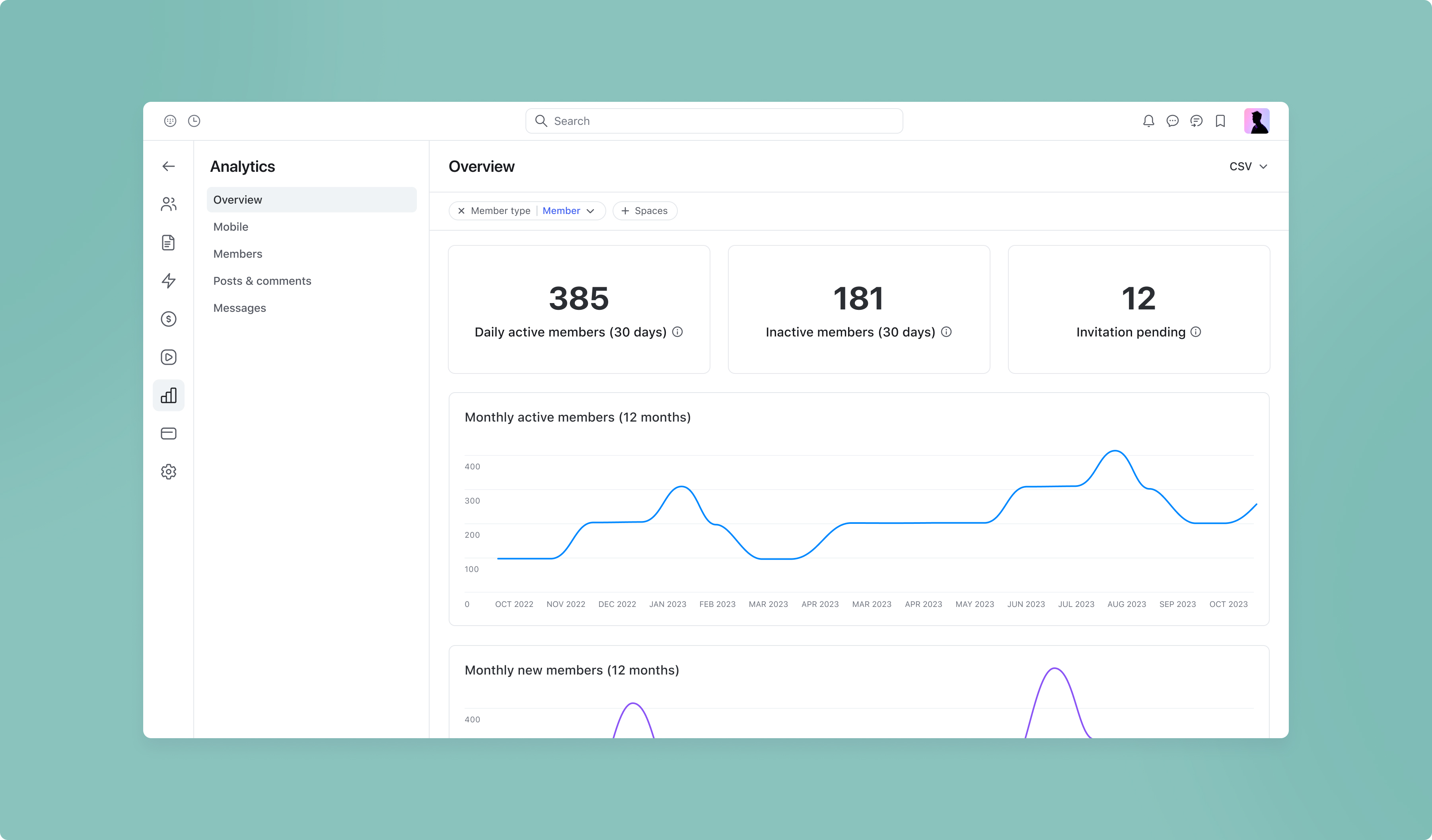
We’ve redesigned and rebuilt our Analytics feature from scratch to make it incredibly fast and easier for you to track and measure your community engagement.
Here’s an overview:
Incredibly fast load times: We’ve improved the load times on analytics to be generally under 5 seconds no matter how big your community is, so that you can access your community data even faster. This involved a full rewrite of our analytics infrastructure and database over the last couple quarters, but we hope you’ll agree it’s been worth it!
Member type filter: We’ve adjusted the default view filter to only show member data (excluding admins), so that you can see the true engagement of your community without admin data potentially skewing your results. However, if you’d like to include admin results in the view, simply click on the Member type filter and select Admin.
Improved date filter: The date filter on the top right of all analytics views now supports preset date ranges, including the last 7 days, 4 weeks, 3 months, and 12 months. To use this filter, click into any Analytics tab (except Overview) and select your preset date range from the dropdown menu located on the top right corner. Better yet, we’ll persist this filter as you click on other tabs!
All graphs and tables are now exportable: You can now export any individual graph or table in CSV, XLXS, or PNG. To export, just click on the ellipsis icon at the top right. Please note, at this time the export only reflects the graph data itself (as displayed on the X and Y axis) and won’t dive into the deeper data set i.e. the specific member level information used.
The export option for the last 30 day active, inactive, and new member list has moved to the top right of the Overview tab.
All columns are now sortable by ascending or descending values. Enough said.
Real-time data: Data for posts, comments, and messages are now in a near real-time state, enabling you to accurately assess historical data at any moment. Newly signed up active members and their posts, comments, messages can take up to 3 hours to be reflected in graphs and tables, but we’re working on speeding this up.
Snapshot-based historical data: By popular demand, we’ve moved to a snap-shot based approach for showing non-member graphs. For example, if a space had 20 posts on a given day, this number will always remain at 20 — even if any or all of the 20 posts are deleted in the future. Previously, the data would reflect the current state of time.
Updates to member tracking
Members with pending invitations: To make it more inline with the definition of inactive, members with pending invitations are now excluded from the “Inactive members (30 days)” number of the Overview tab. Instead, the pending invitation count will be displayed in its own view beside “Inactive members (30 days)”.
Timezone accuracy: We’ve made the daily active member calculations more accurate by catering the calculation to reflect your account timezone.
Coming up in Q4 for Analytics
Here’s something awesome: we’re nowhere close to being done. Throughout Q4, we’ll be adding a substantive list of improvements, including:
New filters for all views: The ability to filter all views by members who belong to a certain space, space group, join date, paywall, or have a specific member tag.
New dashboards:
Paywalls
Events
Courses
Mobile analytics
Activity scores
Date grouping options: The ability to group graph data by day, week or month.
Post view data: View counts for post tables.
Note: While existing analytics features will be available on all plans, some of the upcoming features in Q4 may be gated to our Business or Enterprise plans.
Learn more about Circle Analytics →
Save posts, comments, lessons, and events for later with bookmarks
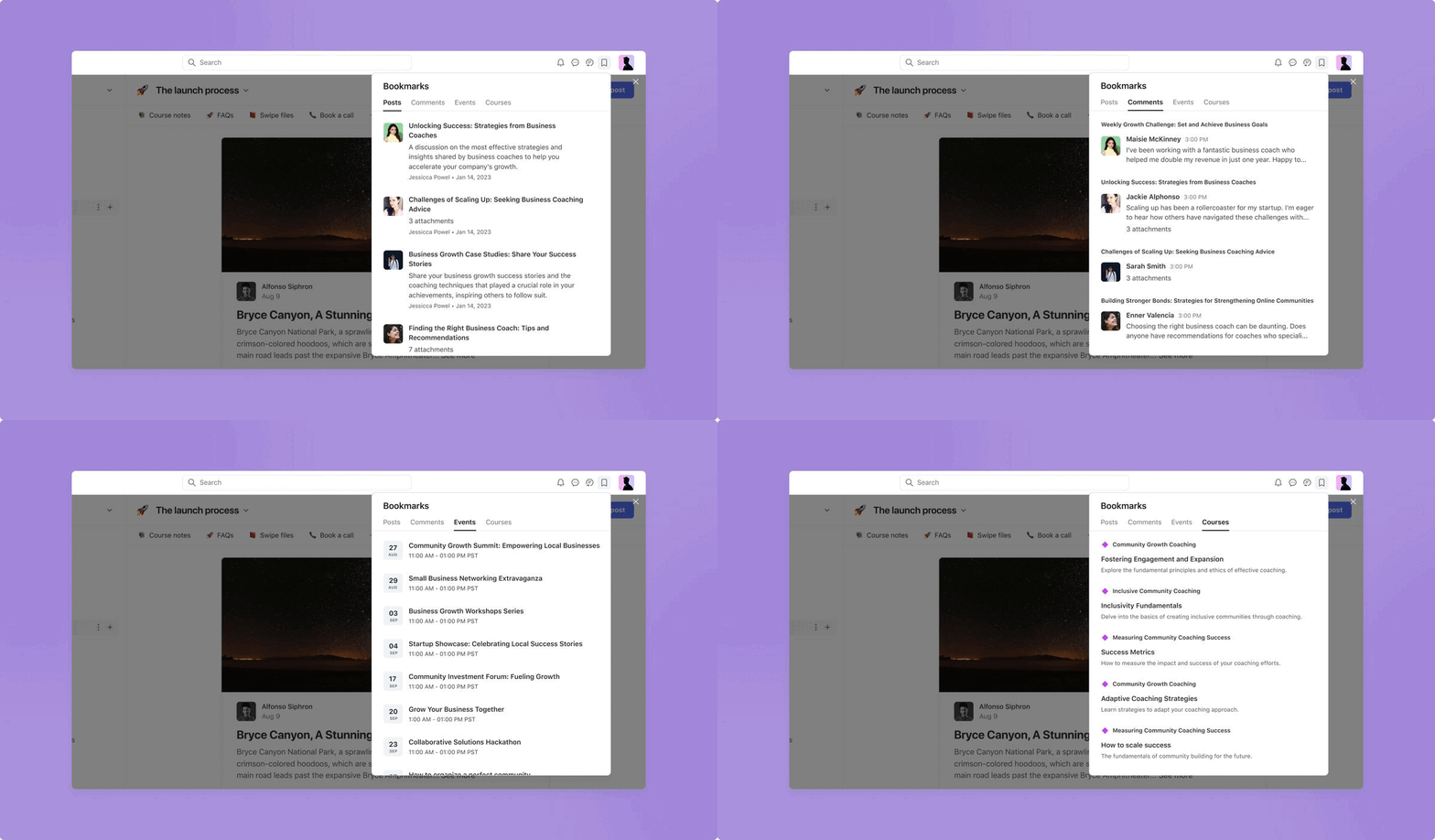
When you’re running or participating in a highly engaged community, the volume of activity and content can outpace your ability to keep up with the good stuff.
That’s why we’re excited to announce bookmarks — the ability for you and your members to save note-worthy posts, comments, lessons, and events to be revisited later.
To bookmark a post, comment, lesson, or event, simply click on the bookmark icon located at the top right of any of these content pages.
To view your saved bookmarks later, click on the bookmark icon beside your profile avatar on the top right of your header.
What happens if the content I saved was deleted?
If the content was deleted, you’ll no longer be able to access this content.
Can bookmarks be used as a reminder for dripped lessons occurring in the future?
Yes! If a dripped lesson is saved to the bookmarks dropdown, clicking on the lesson will take the user to the lesson page. If the lesson is available, it will be visible to the student. If it’s not available, it won’t be visible.
What’s coming up in Q4 for Bookmarks
Support for bookmarking on our iOS, Android, and Circle Plus mobile apps
The ability to bookmark messages in chat spaces, DMs, group chat, and lessons.
Learn more about bookmarking →
Set a one-time upfront payment for your paywall subscription or installment
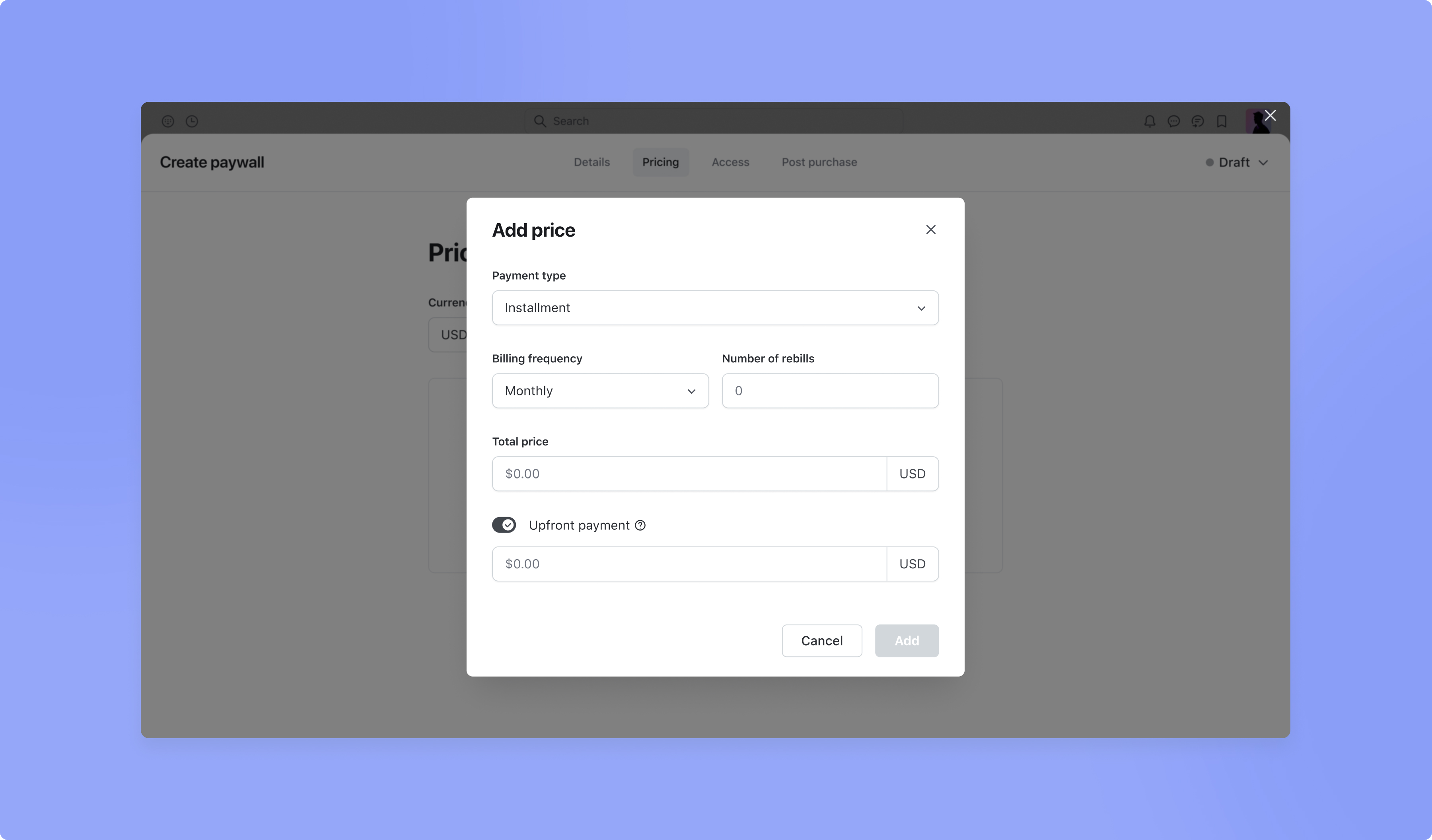
Subscriptions and installments can often lead to higher purchase rates, but it can get tricky to mitigate member churn. A popular solution to this problem is to charge a one-time upfront payment on your paywall subscription or installment before the recurring payments begin.
Setting an upfront payment when a member first checks out on a subscription or installment will allow you to charge members an initial price immediately, and then charge the subscription pricing based on your desired billing frequency (i.e. weekly, monthly, annually).
For upfront payments on installments, once you’ve set your billing frequency, the total price for your paywall, and your desired number of rebills (installments), you’ll be able to add an upfront payment amount. The remaining balance (subtracting the upfront payment) will be divided into equal installments according to your desired number of rebills.
To set up an upfront payment on an existing or new paywall, click on the main dropdown menu located beside your community name/logo. Select Paywalls and choose from either creating a new paywall (click on the Create Paywall button and fill out the information) or click the ellipsis on an existing subscription or installment paywall and hit Edit.
In the paywall modal, select the Pricing tab, then click Add Price. Under Payment Type, you’ll need to choose either Subscription or Installment. After you’ve set your pricing structure (i.e. billing frequency, pricing amounts etc.), you can toggle Upfront Payment on.
Can I set an upfront payment on a subscription or installment paywall that has a trial?
Currently, you can’t set an upfront payment on a trial subscription since the upfront component for trials is generally free. If this is something you’d like to request for our future roadmap, please reach out to support@circle.so with your intended use case.
Can I change or cancel the billing cycle for installments with upfront payments?
No. Keeping the logic that exists for installments, you won’t be able to change or cancel the billing cycle once a customer agrees to pay the installment price at the set cycle.
Can I change or cancel the billing cycle for subscriptions with upfront payments?
Currently, you cannot change the billing cycle for your customers, but you can cancel their subscription. Our team is working on the ability to change the billing cycle for subscriptions for admins.
⭐ Circle paywalls are the easiest way to charge for access to your community via one-time, subscription or installment-based pricing. Click here for a helpful tutorial on how to set up a paywall in your community.
Learn more about upfront payments →
Improvements to event spaces
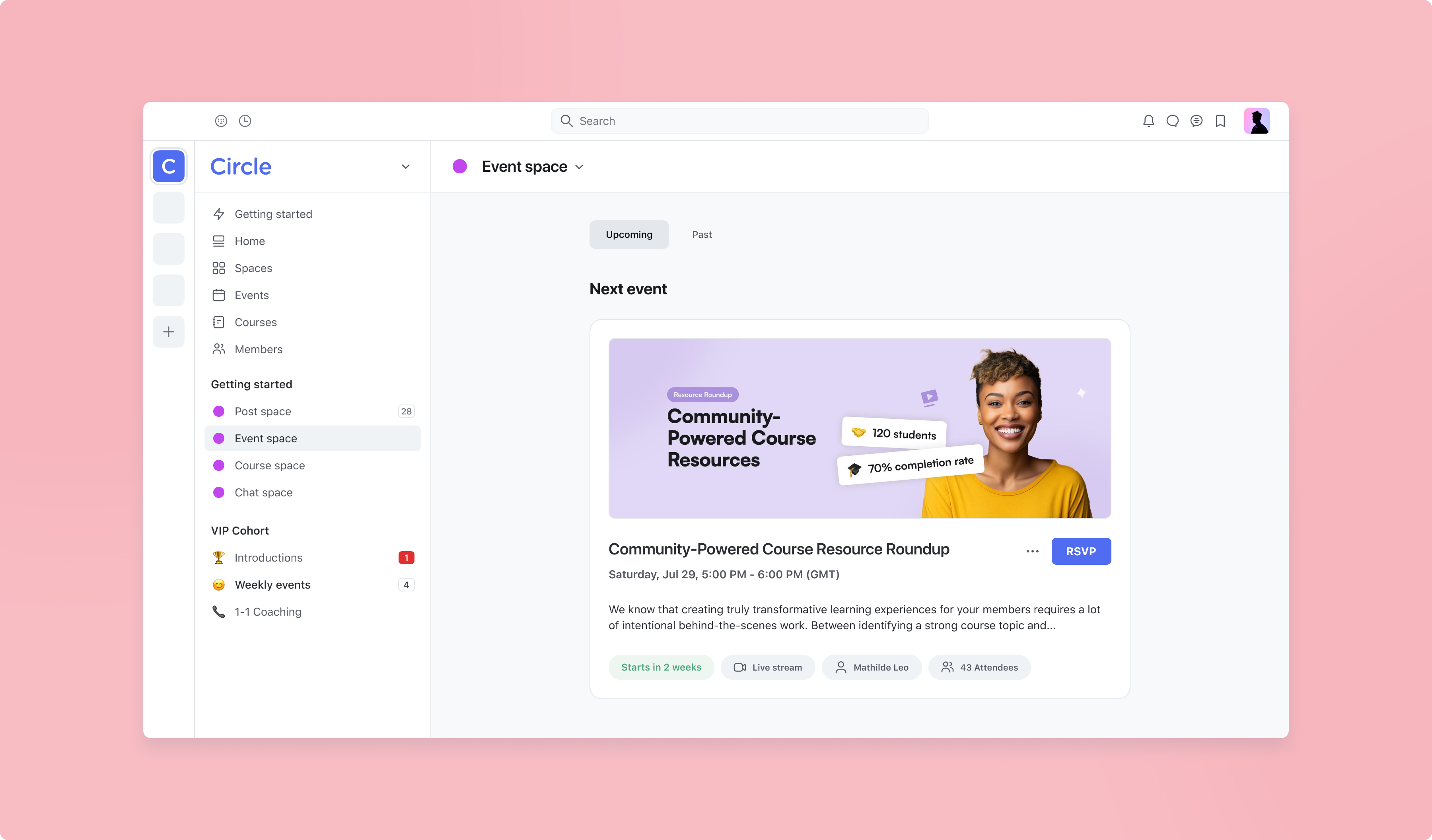
We’ve made some improvements to the design of event spaces to be simpler and even easier for your members to navigate, so that you can maximize RSVPs and attendance.
Featured next event
To bring your members’ attention to the next upcoming or featured event and create urgency to boost RSVPs. Your most immediate upcoming event will now be given a “featured event” treatment, showing the high-level details of your event including a countdown label that shows the time remaining until the event starts.
Of course, you can override this at any time by manually featuring an event by clicking “Pin to space” from the ellipsis dropdown on a particular event. Or if you’d like to disable this behavior entirely, you can toggle the Display next event setting off in space settings.
Thumbnail layout
You now have the ability to choose between two layout options for your event space: Thumbnail or List. By default, event spaces are set to the existing List layout and we won’t be changing that for existing events. But if you’d like to change your event space to use the new Thumbnail layout, you can do so in space settings.
While the existing List layout emphasizes readability and the event date, the Thumbnail layout shows a smaller version of your event cover image next to each event to give your event space a more visual aesthetic.
Learn more about our new event space design changes →
Easily link to pages in your community from chat messages
We’ve made it simpler for you and your members to link to spaces, posts, lessons, and events in your community from the message editor in DMs, chat spaces, and group chat.
Just like mentioning members using the @ key, you can now use the # key to search for a page within your community to link to, or click on the # icon at the bottom left of the chat editor. Once you find the page that you’re looking for, simply select it to link it out. Links will show up on mobile apps, and the ability to link to content from a mobile app will soon be supported.
In Q4, this feature will be extended to the posts, comments, lessons, and event text editor to make it easy to refer to any page in your community.
Learn more about linking in chat messages →
iOS improvements
We also shipped a few improvements to Circle’s iOS app:
Ability to apply text formatting styles in chat, posts, and comments
Visual and reliability improvements
Added a prompt for new member profile completion
Improved member mentions display
Improved reliability when using push notifications
Various performance, reliability, and visual improvements
Android improvements
Plus, here are some improvements on Circle’s Android and Circle Plus branded apps:
Deep link navigation to comments
Support for video captions
Support for in-line custom HTML on Circle Plus branded apps
Ability to edit profile
Ability to create profile
Performance, reliability, and visual improvements
Other improvements
Search for students in course spaces: We’ve added a new search bar to the course dashboard in a course space to help admins find students easily.
Easily sign in to new Circle communities with an OTP: If a non-member tries to login an existing public Circle community and already has a Circle account, we’ve made it easier for them to sign in without a password by enforcing a one-time passcode.
Removed additional login step for custom domain communities: Previously, for custom domain communities, clicking “Log in / Sign up” would redirect users to another screen to “Log in with Circle” before they could enter their credentials. We’ve removed the extra step.