🎇 July Update: Improved search, drip courses, mentions tab, and 10+ improvements
We’re focused on improving our core user experience and shipping the top 12 feature requests for the rest of the year. These features include improved search, drip courses, duplicate spaces, reactions, polls, mentioning @everyone, paywall affiliates, a space type for images, and more. We’re extremely grateful to you for choosing us as your community platform, and we hope to deliver on your high expectations 🙏
This July, I’m excited to share that the Circle team has made significant progress toward this goal: we’re rolling out a new UI for search, drip courses, a way to see all your mentions in one place, and 10+ other improvements.
For details, check out this month’s roundup below 👇
Improved search with command center and a full results page

Starting next week, we’ll be rolling out a new UI for search on all communities and make it easier for you and your members to find what they’re looking for!
Now when you click on search or press CMD + K, you’ll open up a command center which lets you quickly navigate to spaces or member profiles as you start typing.
You can use the up and down arrow keys to move between options, or hit Enter on the first option to do a full community search. When you do so, you’ll see a full screen view of results categorized into helpful tabs for posts, comments, events, lessons, and members.
Since each type of result is no longer competing with other types for relevancy, this updated view helps you and your members find exactly the kind of information you’re searching for, and the expanded area shows you a meaningful preview for every type of result.
In addition to these updates, your members can now search for content in lessons as well as posts, comments, events, spaces, and members.
Rollout begins Monday Aug 7 for all communities. Over the next few weeks, we’ll also be releasing follow-up improvements such as additional filtering options for date, author, and space.
Learn more about enhanced search →
Schedule releases for lesson sections with drip courses
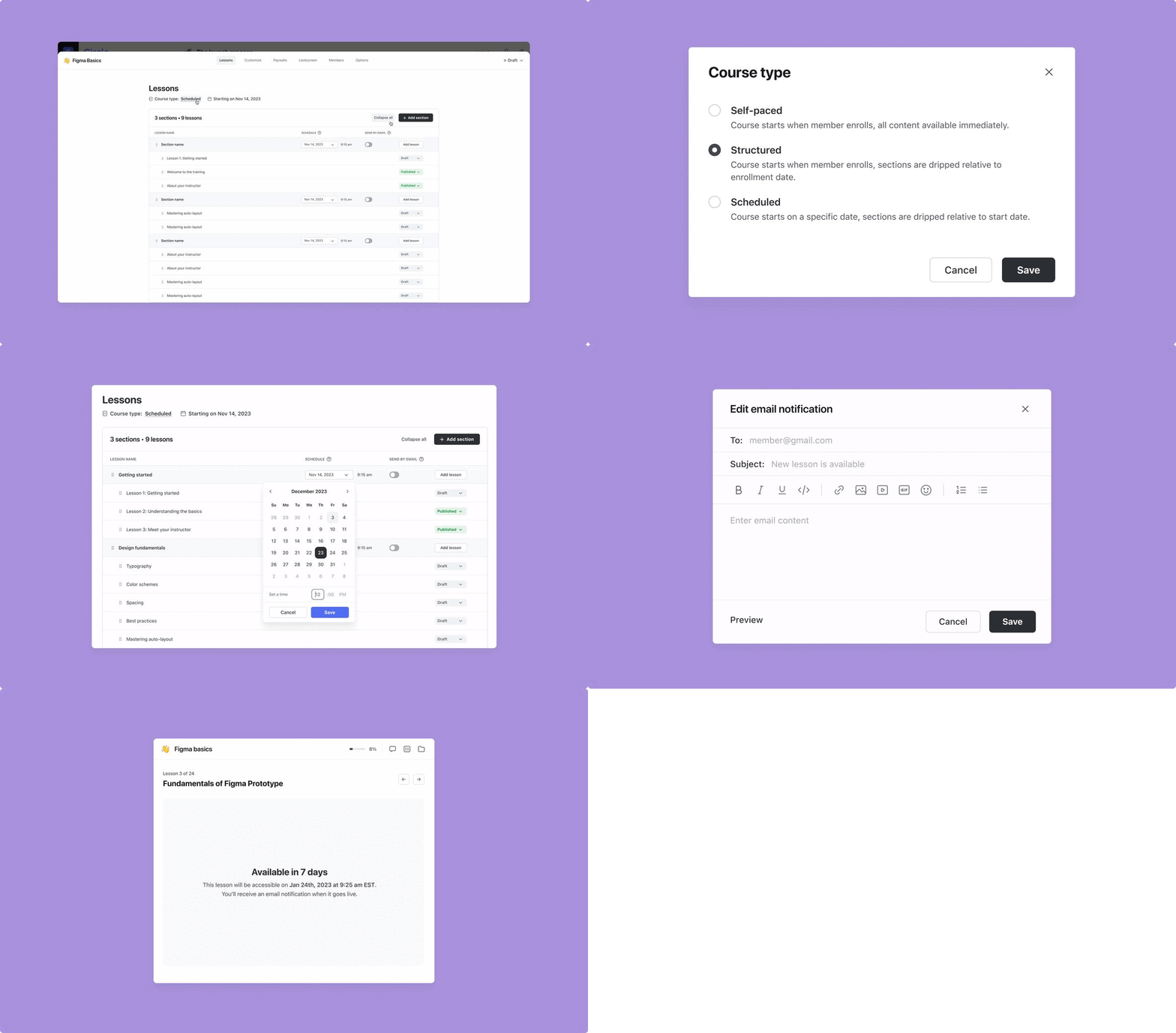
Our most requested improvement for courses is here starting today — drip courses!
With drip courses, you can create a better learning experience for your students by delivering course material at a pace suitable for your content.
Course creators will now be able to choose between building three types when building a course:
Self-paced
All published lessons are available immediately after enrollment and students can complete the course at their own leisure.
Structured (NEW!)
Published lessons in sections can be unlocked relative to a student’s enrollment date. For example, you can set a lesson section to be released any number of days or weeks after an individual student’s enrollment. If you’d like to release a section immediately after enrollment or when you publish it, you can do that too.
Scheduled (NEW!)
Published lessons in sections can be scheduled to release on a fixed date and time for every member of your course. For example, you can set a lesson section to be released on September 20, 2023. If you’d like to release a section immediately after enrollment or when you publish it, you can do that too.
Once you select the course type, you have the ability to set the release schedule for every section, which includes making it available immediately.
You can toggle on a notification preference for your members to receive an in-app, email, and mobile push notification when the section is released, and fully customize the email notification.
If you’ve already built a self-paced course on Circle, you can change it to a structured or scheduled course type by clicking on Course type: Self-paced option at the top left of the course lessons editor.
NOTE: Regardless of the course type, a lesson must be both published AND released via the chosen drip structure in a section in order to be visible to a student. If a lesson is in draft and the specified drip date and time has arrived or the lesson has been published and the specified drip date and time has not arrived, the lesson will not be available to your students. If you publish lessons in an un-released section, they won’t be visible to your students.
⭐TIP: Paywall installments and drip courses go hand-in-hand for great-selling courses! Charge for your course space in installments and release course lessons at specified time frames with drip, so your customers can receive content at a manageable pace and have more flexible options for payment. See how you can set up paywall installments here.
Learn more about drip courses →
Keep track of all your mentions in one place
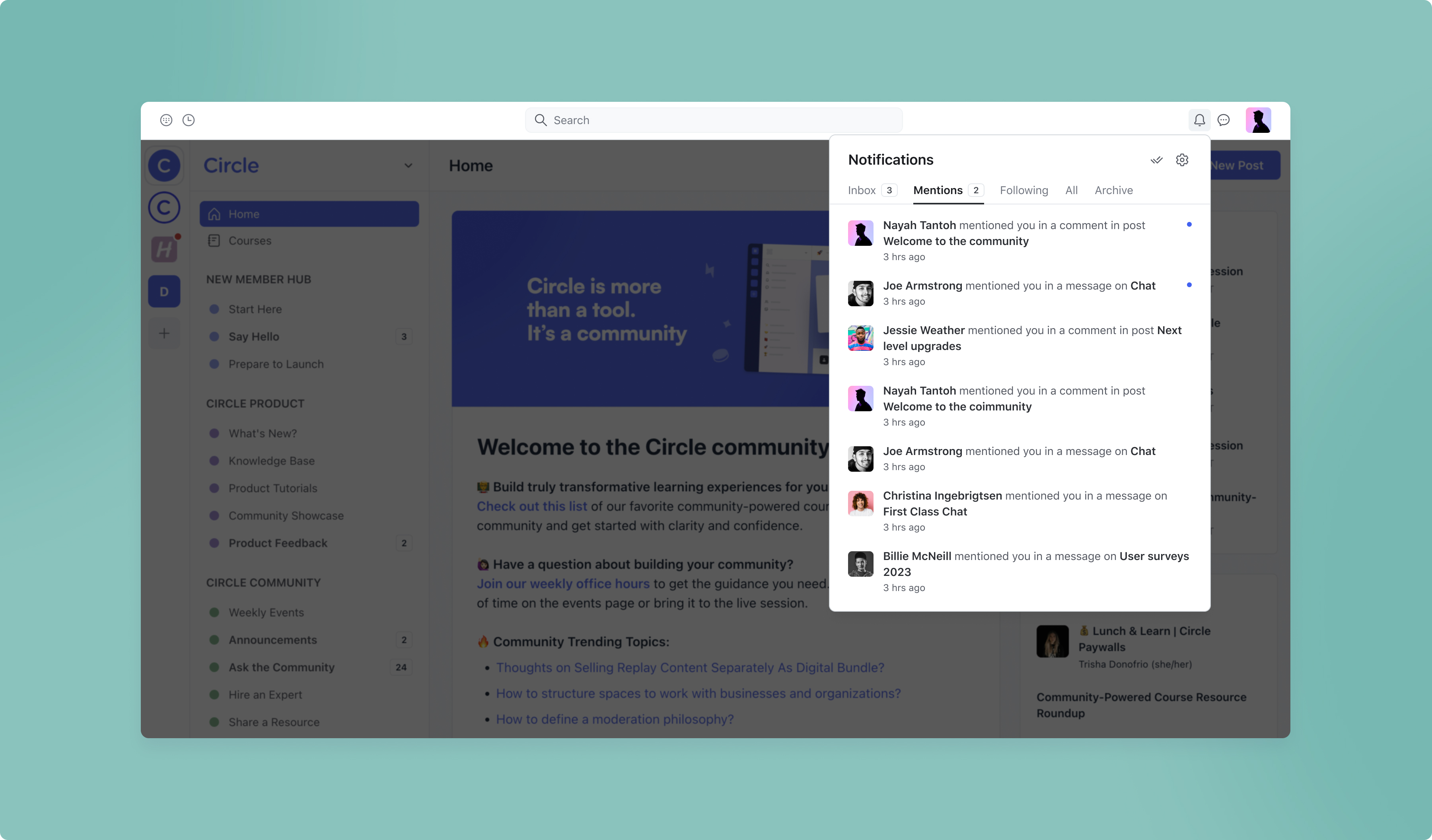
If you have an engaged community, you know that trying to keep up with all your notifications can get overwhelming — there’s so much to keep track of!
Now you and your members can see just the posts, comments, or chat messages you’re @ mentioned in by clicking on the Mentions tab in the notifications dropdown on the top right.
Learn more about community notifications →
Simpler UI for controlling paywall-level space access
When you’re editing space access settings in a paywall, our new UI includes a full view of your community space structure, so that you can easily visualize which spaces and space groups a paywall unlocks access to.
To change your paywall access settings, select Paywalls in the dropdown menu and click on the paywall you’d like to edit. In the edit form, choose Access. You should now be able to add/remove spaces and space groups with ease.
Learn more about paywall space access →
Other course improvements
Ability to mark completed lessons as incomplete
In the instance that a member wants to undo a completed lesson, they can now mark the lesson as incomplete again.
Improved course directory
We’ve made some minor design updates to the community course directory, located in the sidebar under “Members”:
Added badges for new courses and courses in drafts
Added support for multi-line titles
Added a join course button
Learn more about the course directory →
New WordPress SSO integration: MiniOrange
For all community owners using WordPress SSO and looking for an alternative to WP-OAuth, we’ve added a new free preset integration with MiniOrange for Professional plans and above.
iOS improvements
We also shipped some improvements on iOS:
Ability to delete posts and comments
Chat message improvements
Ability to access live streams from an iPad device
Lots of minor stability, performance, and UI improvements