🔥 August Update: Voice messages, schedule workflows, webhooks, and 15+ improvements
August was a very special month for team Circle. We had two separate team offsites in Italy and Thailand, where our team members from 25+ countries gathered to build and celebrate our very own company community in-person, and to make plans for the years ahead 🎉
The result? We came away with even more enthusiasm to exceed our goals, and immense gratitude for the fact our shared mission to build the best platform for you brings us together from all around the world.

…On to the update!
This month, we rolled out another substantial list of improvements and made great strides toward our commitment to deliver the top 12 most requested features by year-end. Check out what we shipped below 👇
Send voice messages in DMs and chat spaces
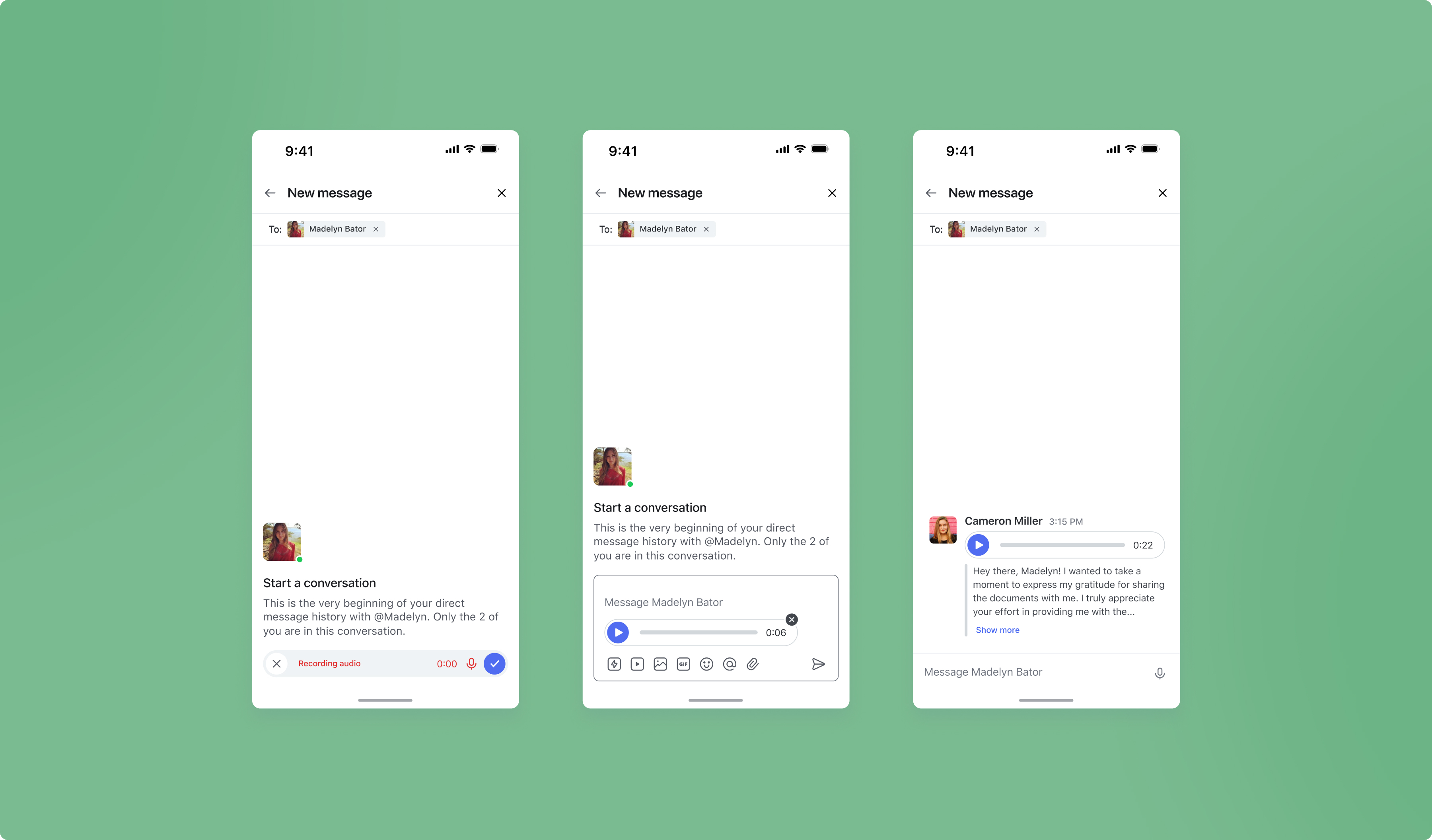
The wait for voice messaging is over! Your members can now build more intimate connections by sending voice messages in 1:1 direct messages (DMs), group DMs, and chat spaces.
To send a voice message in a DM or chat space, simply click on the microphone icon in the text area to start recording and then hit the checkmark when finished or the “X” to delete the message.
Voice messages are supported on the web and on all mobile devices, including iOS, Android, and Circle Plus apps.
If you’ve enabled automated transcriptions (one of our Community AI features), the transcript will be displayed below the recording. Transcriptions will be available on the web to start, and on our mobile apps in the coming weeks.
⭐ FYI: In Q4, we’ll be adding voice messages to posts and comments as well. Hold tight!
Learn more about voice messages →
Schedule bulk action workflows
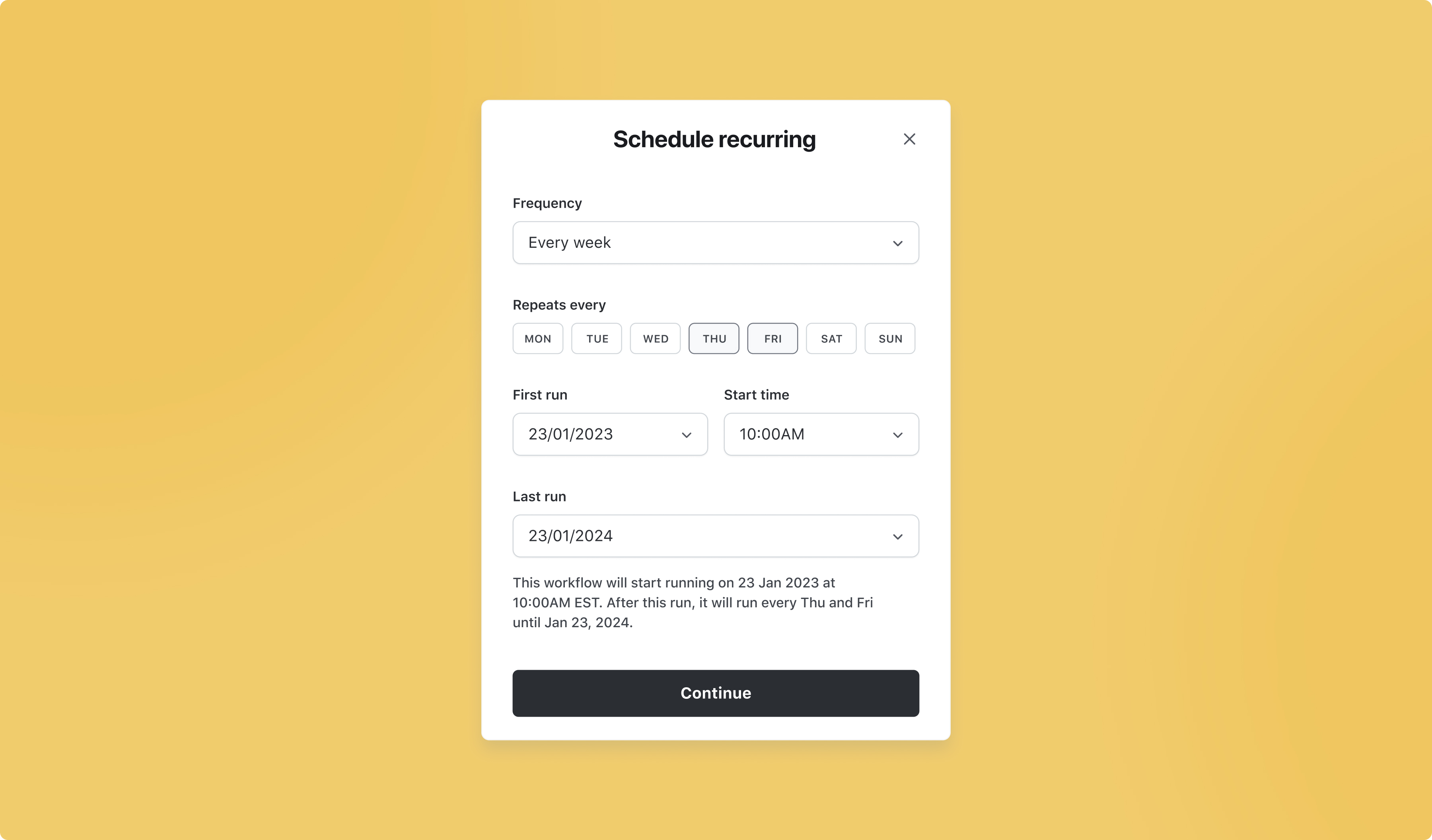
You can now schedule workflows in advance on a one-time or a recurring basis, which means you no longer need to manually set up your bulk actions prior to each run, saving you even more time and effort.
To schedule a bulk action workflow, navigate to your community’s main dropdown menu and select Workflows. Click the New workflow button and in the popup modal choose Custom workflow located on the left hand bar. You’ll see three options to choose from: automation, bulk action or scheduled, select Scheduled.
⭐TIP: Kick-start your onboarding and boost engagement by setting up a recurring bulk action workflow to welcome new members into your community. Discover how to use bulk actions here.
Learn how to schedule bulk action workflows →
Send webhooks to your own custom endpoints using workflows
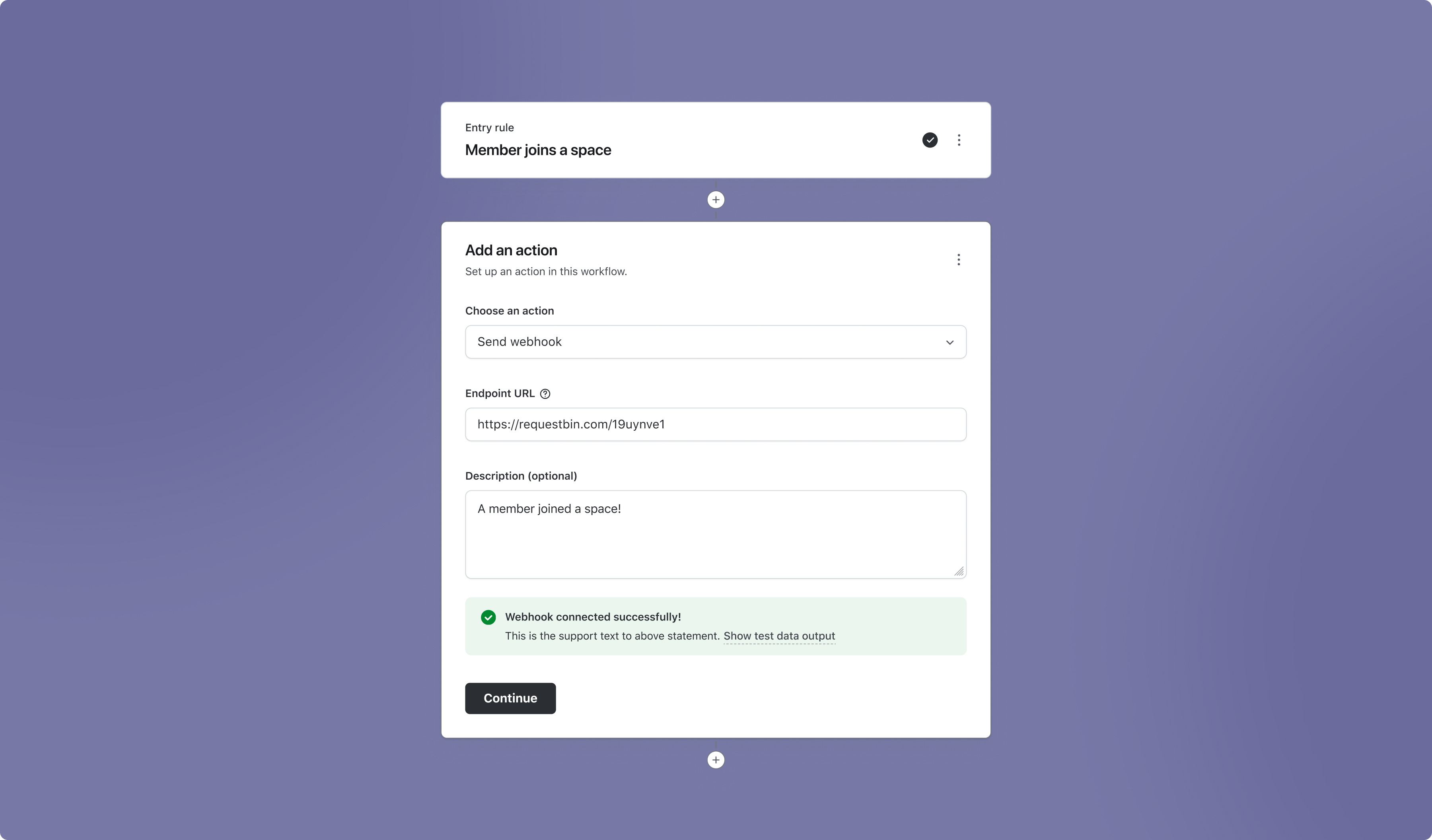
We’re making it even easier for advanced communities to receive data from Circle by introducing support for webhooks in workflows!
When you set up an automated workflow, you can now add the Send to webhook action on our Enterprise plan or higher to start receiving webhooks automatically to your custom webhook URL.
This is a feature built for the more technical community builders or those who have expertise on staff, so if you’re wondering what webhooks even are, you’re not alone.
A simple explanation is to think of webhooks as reverse-APIs. Webhooks enable back-end messages from apps (in this case, your Circle community) to be sent automatically when something occurs (for example, when a member joins a space or a member likes a post) to a custom webhook endpoint inside your own app (read more about receiving webhooks).
With webhooks, an engineer or a highly technical person can automatically extend interactions within Circle into their own app, instead of manually polling our GET API endpoints for changes. Webhooks are fired instantly when an event occurs, which makes them close to real-time instead of the necessary delays with polling API endpoints.
And the best part? It’s all done in Circle. You won’t have to rely on other apps for workarounds.
Notifications for comments in course lessons
To help you stay on top of comments in your course lessons, admins and moderators will now receive an in-app and push notification whenever students leave comments in course lessons.
Note: Comment notifications are enabled by default in your course space. If you’d like to turn them for a specific course, select the course space, click on the dropdown menu beside the title, and click Edit space. Now click on Options and toggle Notify course admins about new lesson comments off.
Learn more about notifications in course lessons →
New paywall variables in conversion tracking code
We’ve added new variables to the conversion tracking code editor for paywalls. In addition to member email, admins can now use the new JavaScript variables to identify the:
Paywall name
Amount paid
Coupon code (if available)
Trial days (if available)
Price interval (i.e. monthly subscription or installment)
Price type
To use JavaScript paywall variables in your custom tracking code, you can navigate to your community’s main dropdown menu and select Paywalls. Hover over the paywall you’d like to edit and click on the ellipsis dropdown and choose Edit. In the popup modal, select Tracking. You’ll be able to see the list of new variables by clicking on the {...} icon.
Learn more about the new paywall variables →
Improved UI for granting space access to moderators
Now you can manage space access to moderators with an improved UI for managing which spaces your moderators are a moderator of.
To change space access for your moderators, go to the Manage members area, find the member, and click the Edit link in the ellipsis dropdown. Navigate to the Access tab and select Moderation, where you’ll be able to select which spaces you’d like to give them moderation access to.
Learn more about space access controls →
Enhanced security with state parameter in SSO
To help keep your community secure from cyber attacks, we’ve added the option to enable a state parameter in single sign-on (SSO). This parameter follows best practices for OAuth 2.0, and ensures that your members successfully authenticate into their SSO session without the risk of authentication forgery and other security concerns.
iOS improvements
We also shipped a few improvements to Circle’s iOS app:
A new notifications tab for mentions
Accessibility improvements for post and comment composer
Ability to edit your profile
Visual improvements to the member profile screen
Display improvements to for posts in spaces
Post comment improvements
Support for voice messaging
Android improvements
Plus, some improvements on Circle’s Android and Circle Plus branded apps:
Support for voice messaging
Automatically mention members when replying to comments
Other improvements
Content duration in the lesson curriculum: Your students will now be able to see how long your course will take to complete (based on audio & video files), as well as a time required breakdown for each lesson.
Bi-weekly event scheduling: You can now schedule recurring events on a biweekly basis, for example, bi-weekly on thursdays.
UI improvements on mobile web: This quarter we’re making updates that enhance user experience and mobile responsiveness.
Improved file upload system: We’ve greatly increased the speed when uploading files to courses and posts (comments are coming soon).
Updated DM permissions: Admins can now DM members who have messaging disabled.