🤝 October release: Introducing Connect, redesigned analytics, and more
There’s a moment in every great community when two members meet and something clicks.
They realize they share a story, a goal, or a challenge. They start chatting, collaborating, learning from each other, and before long — they meaningfully connect.
Today, we’re excited to launch Connect: a new way for members to connect with each other in your community.
Circle Connect v0-94.mp4Introducing Connect
Connect adds a new layer to every community on Circle. It helps members discover each other, reach out naturally, and form authentic relationships that keep them engaged for the long term.
As for community admins, Connect can give you visibility into who your members are connecting with, and how their relationships are growing over time to strengthen your community.
Starting early November, Connect will be rolling out in an opt-in public beta. If you’d like to be notified when it’s available for your community, click here.
Recommended matches
Connect.mp4Connect makes it possible for your members to find people who they have things in common with.
Behind the scenes, we’ve built an AI-powered social graph to suggest people who share similar profiles, spaces, or interests. Members can browse their recommendations, send a quick connection request (with an optional note), and start building relationships without the awkwardness of a cold DM.
The algorithm powering Connect learns from real member behavior. As more people connect, it refines its recommendations, creating a flywheel effect that strengthens both engagement and accuracy.
For your members, this means fewer missed opportunities, and meeting the right people, faster.
For you, it means a community that feels more alive, more connected, and more likely to stay engaged.
Personalized suggestions based on profiles and activity
Connection requests that lower the barrier to start conversations
Recommendations that highlight mutual goals and interests
Member discovery
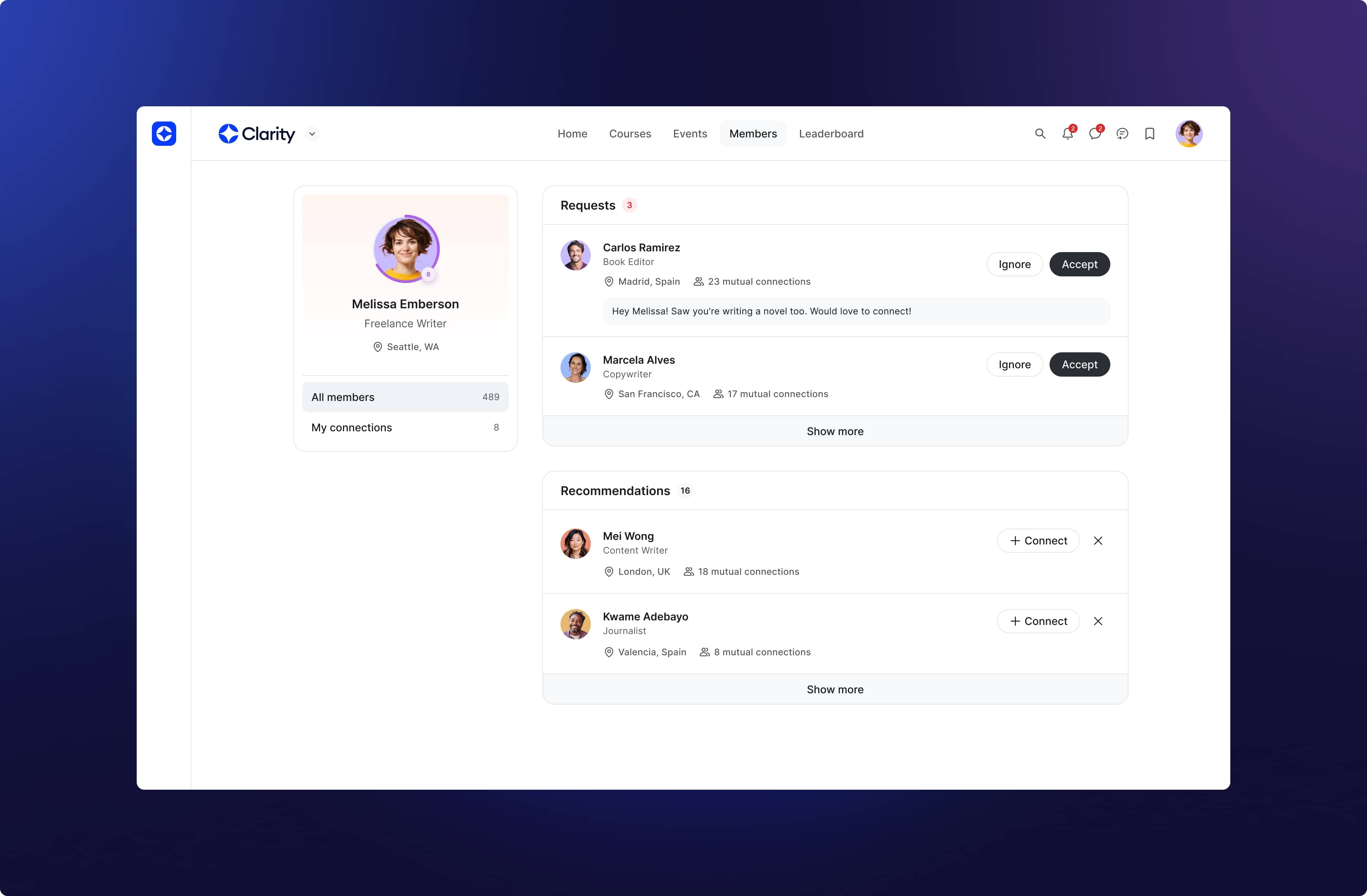
The member directory has been reimagined for how relationships actually form.
Members can now browse three focused views:
All members: everyone in your community
My connections: people they’ve already connected with
Recommended: people they’re most likely to click with
Also, we’ve now made it easier for your members to filter the member directory by emphasizing the filters that matter to them.
Connection insights
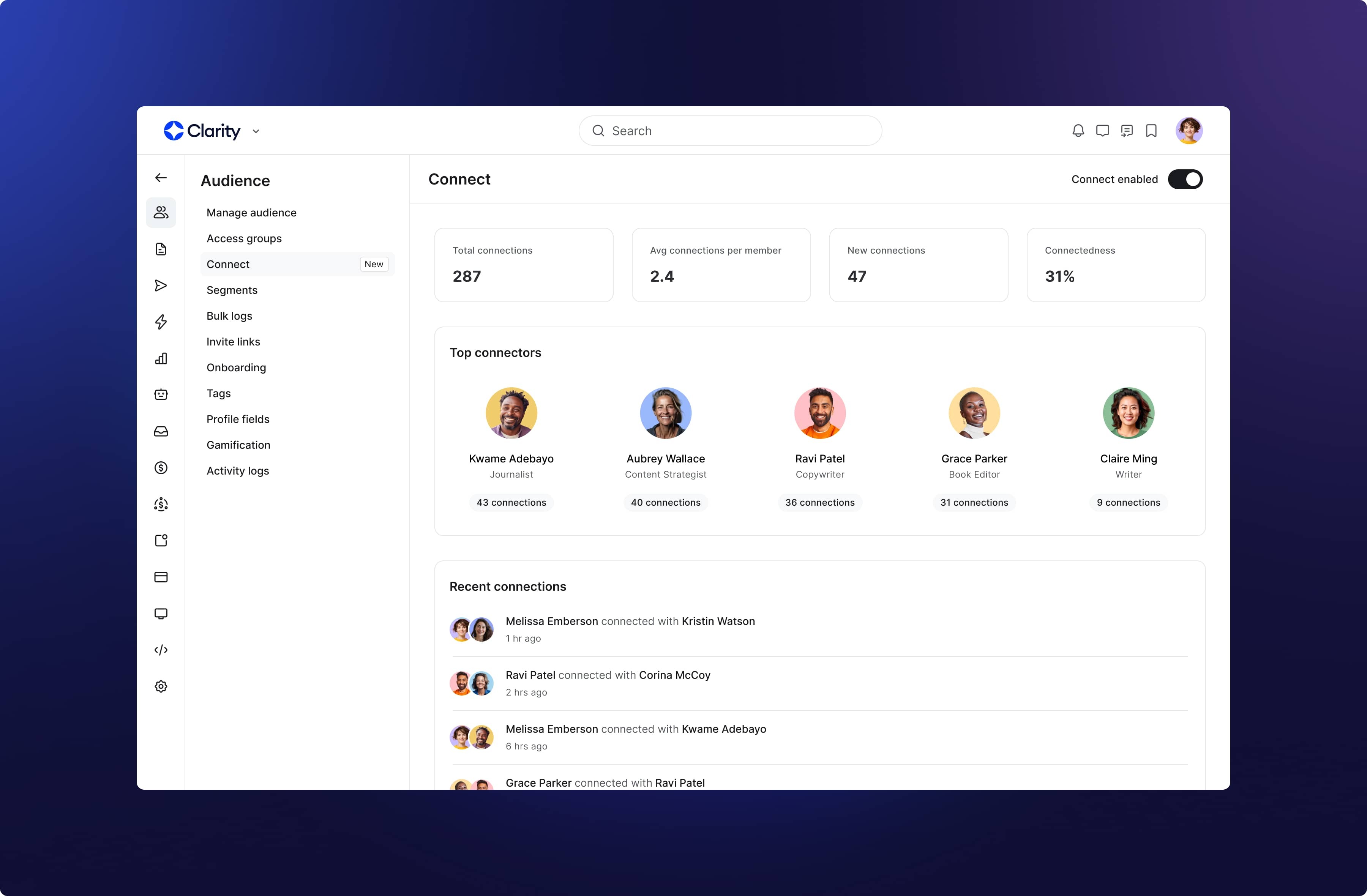
The more your members connect, the more they engage with your community.
With connection insights, admins can now see how relationships are forming and where the strongest clusters are.
You can use insights to:
Track connection growth and engagement trends over time
Identify top connectors and rising contributors
Understand the health of your community’s social fabric
These insights help you do more than measure engagement; they help you nurture it. You’ll see which spaces and members are driving real connections, so you can double down on what’s working.
Beta roll-out starts in November
Starting early November, Connect will be rolling out in an opt-in public beta. If you’d like to be notified when it’s available for your community, click here.
Once it’s available, you’ll be able to enable Connect by going to Audience → Connect → Enable Connect.
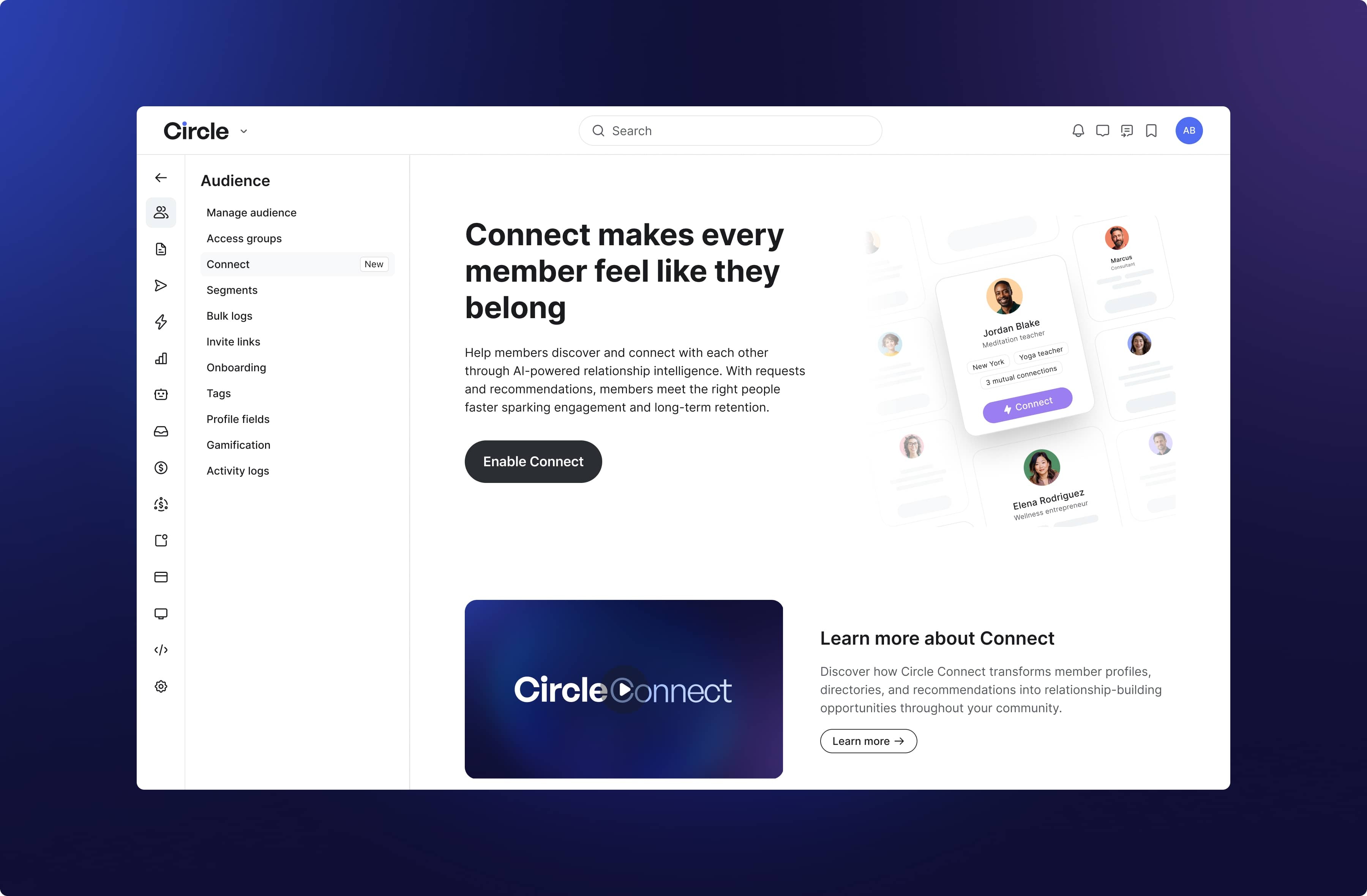
After it’s enabled, you will see:
Connect buttons on member profiles
Personalized recommendations in the member directory
Enhanced discovery and networking tools
A “My connections” area for relationship management
An admin dashboard to understand your members connection patterns
Visual email builder is now available for all communities
Last month, we introduced our new visual email builder — a simple drag-and-drop tool that lets you design beautiful, professional emails without any coding.
You can choose from templates for newsletters, events, or announcements, then customize layouts, colors, and styles to match your brand. Plus, you can preview your email on desktop or mobile before sending.
Try it out by going to Marketing → Broadcasts → New broadcast and selecting the visual email builder.
To learn more about the visual builder, check out our guide here.
Redesigned analytics
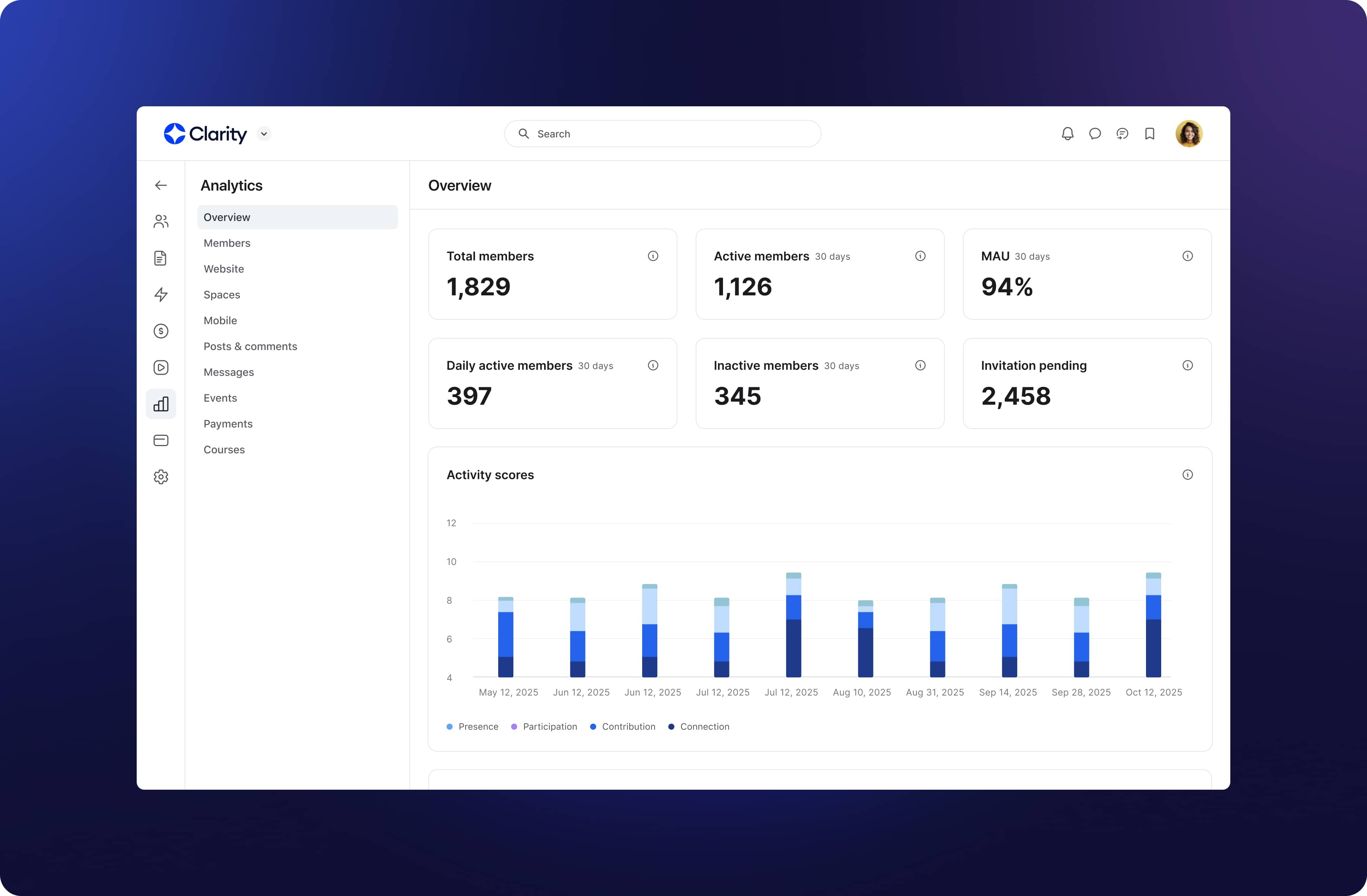
You’ll now see a faster, cleaner, and more intuitive analytics experience across Circle. The updated dashboards feature interactive charts, improved data accuracy, and a refreshed design, making it easier to explore insights and understand trends at a glance.
Paywall workflow triggers & actions
You can now automate more revenue workflows and member experiences with new paywall-based triggers and actions for cancellations, trials, and installments. This gives you more control over the full member lifecycle.
For cancellations: New triggers fire when a subscription is scheduled to cancel, canceled, or resumed, allowing you to automatically send retention offers or reactivate member access.
For trials: Triggers fire when trials start, convert, or end, and new actions like Subscribe to paywall trial let you automatically enroll members in selected offers.
For installments: A new trigger fires when the final installment payment is completed, so you can celebrate with a personalized message or unlock bonus content.
These additions make it easier to automate key lifecycle moments, from cancellations and trial conversions to installment completions, all directly within Workflows.
More triggers and actions for upgrades, downgrades, and coupons are coming soon.
New EU payment methods
We’ve added three European payment methods to help communities sell in EUR and make it easier for members to pay with familiar local options.
iDEAL and Bancontact support one-time payments and initial subscriptions, while SEPA Debit enables direct IBAN entry for recurring billing.
When a paywall’s currency is set to EUR, all three methods appear automatically — iDEAL and Bancontact via quick redirect, SEPA Debit via inline IBAN entry.
iDEAL and Bancontact are enabled by default, and SEPA Debit can be turned on in Paywalls → Settings, with an in-product info modal to guide you through setup and settlement timing.
This rollout is starting now and will be fully live across all communities by the end of the week.
Other updates
Activity logs support for access groups: Gain full visibility into changes in your access groups with detailed activity logs. All configuration updates, member additions or removals, and access grants or revocations are now automatically logged, giving you a complete audit trail for security, compliance, and troubleshooting.
Reduced price customization for paywalls: Give offers more impact with strikethrough pricing that gently highlights savings by showing a reduced price beside the original amount. Learn more here.
Save and reuse blocks in website builder: You can now save time by saving and reusing your favorite designs across your webpages. This makes building and maintaining consistent, polished pages faster and simpler. Learn more here.
Export chat data to CSV: Admins can now chat history as a CSV file with options to filter by time period (month, quarter, year, or all time). The CSV includes timestamps, member names, emails, and messages, delivered via email to the requesting admin.
iOS improvements
We also shipped a few improvements to Circle’s iOS app:
iOS 26 visual updates
Support for deep linking to main tabs Home, Feed, Notifications, Messages
Swipe down to dismiss when viewing media
Support for group chat invitation links
Improved comment viewing
Improved profile editing
Support for link preview modal in chat
Performance, reliability, and UI/UX improvements
Android improvements
Plus, here are some improvements on Circle’s Android and Circle Plus branded apps:
Support for Email Hub links
Improved cover image display
Faster load time for images
Improved push notification setup
Performance, reliability, and UI/UX improvements