🎃 October Update: Affiliates, duplicate spaces, chat reactions, group mentions, and 20+ improvements
It’s hard to believe we’re almost at the end of the year.
As we shared in July, our team has been focused on shipping the top 13 community requests for the rest of the year. I’m happy to share that we made an incredible amount of progress in October by adding affiliates, duplicate spaces, chat reactions, and group mentions to the “Shipped” list, along with 20+ other improvements!
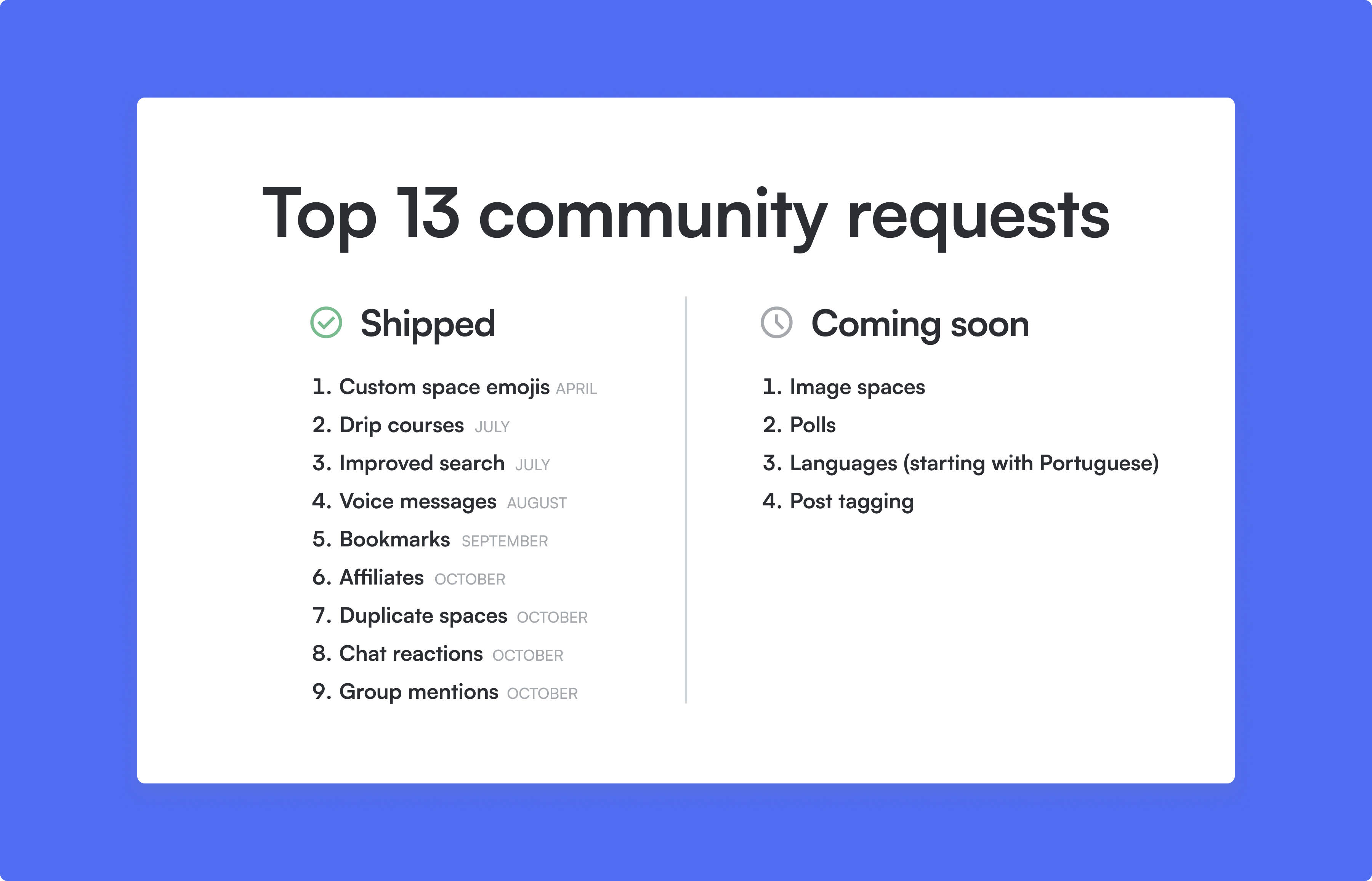
Check out the full update 👇
Set up your own affiliate program
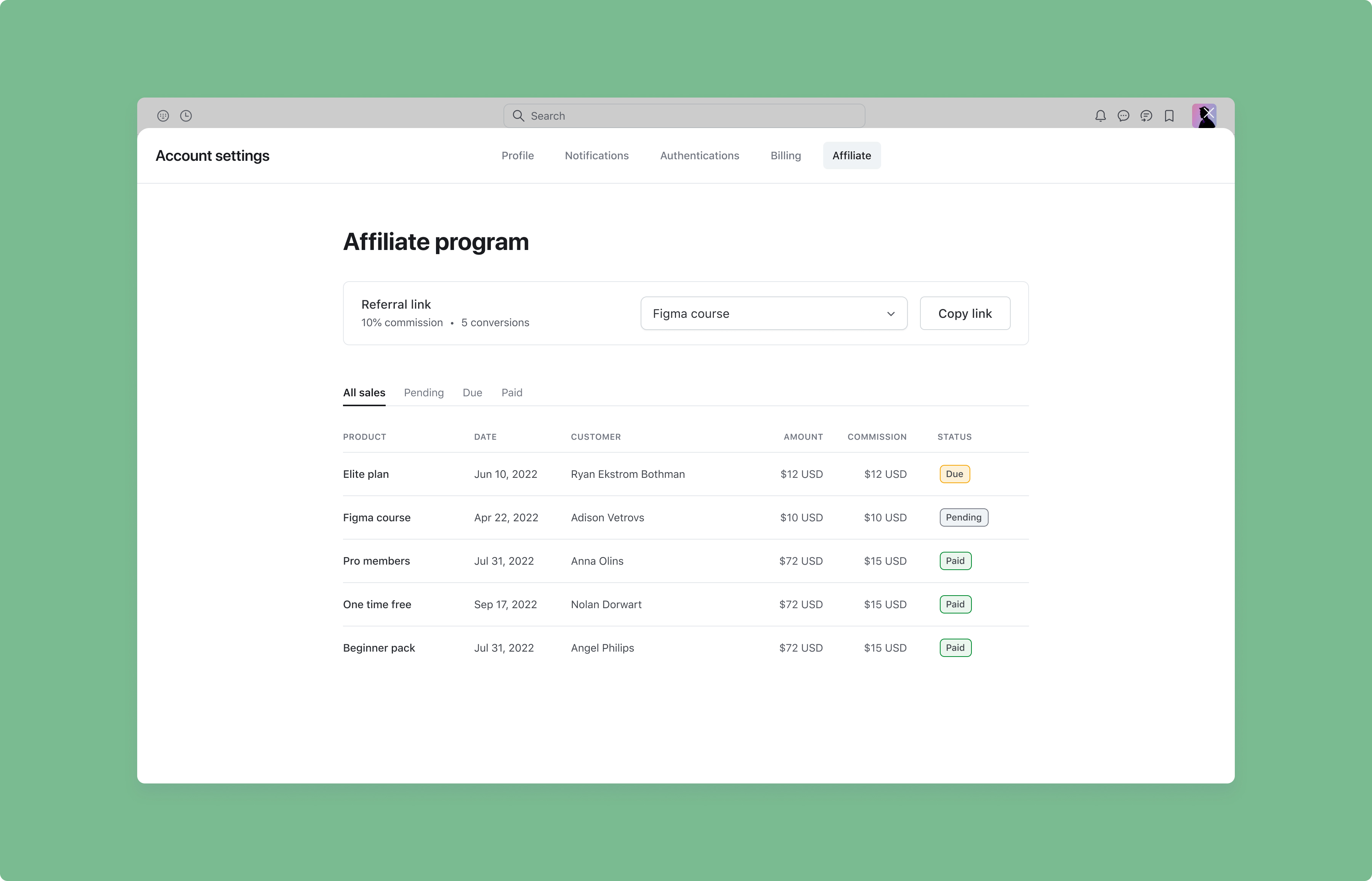
Affiliate programs can be a great way to grow your community, and now it’s supported natively on Circle for those using Circle paywalls.
With our new affiliates feature, you can add and manage your affiliates, set up commissions on your paywalls, generate affiliate links, track their sales, and more — all within Circle. This means you no longer need to rely on integrations if you’re using Circle paywalls.
To set up an affiliate program for your community, navigate to your community settings area and select Affiliates on the sidebar. Follow the instructions to set up your affiliate program, choose your preferred Reward type (percent or fixed commission on each sale), set your commision percentage/amount, and customize your payout settings.
You can select which paywalls you’d like to use for your affiliate program, or if you’d like your commissions to be applicable to any paywall in your community, you can toggle on Enable for all paywalls.
Once your program is activated, you can start inviting your affiliates. If they’re already a member in your community, you can search for them and make them an affiliate in one click. If not, you can send them an email invitation to join your program.
Once they sign in, your affiliates have access to a dashboard in their Account settings area which lets them see their unique affiliate URL, track commissions, and enter their payout information.
Like most other affiliate tools, we make it easy for you to pay out your affiliates every month using PayPal’s mass pay feature or Wise by giving you a CSV export for payout details and amounts, which you can then import into these services.
What’s coming up?
Since a lot of you have been waiting for it, we wanted to get affiliates out the door as soon as we could. But we’re far from being done: we’ve got a lot more improvements coming up in the next few months, including the ability to:
Customize commissions for subscriptions and installments: To give you more flexibility with recurring paywalls, you’ll be able to choose whether you want to attribute an affiliate commission to the first payment only, all recurring payments, or a certain number of recurring payments (i.e. first three).
Overriding commissions on paywalls: Set paywall-specific commission rates to override your default.
Shareable campaign links: Create a shareable link to allow new affiliates to sign up to your program.
Code snippet for tracking referrals from external landing pages: Embed a Circle code snippet on your external landing page to track referrals and customize your affiliate’s shareable link to redirect customers to your landing page.
Bulk add affiliates: Easily import all your affiliates with a bulk CSV import.
Manual attribution for referrals: You'll be able to manually backfill an affiliate referral so commissions from untracked referrals still get recognized.
Automate your payouts: Connect your Paypal or Wise account to Circle, so you can automatically pay out your affiliates.
⭐ Want to use the affiliate feature but haven’t set up a paywall yet? Click here for a helpful tutorial on how to set up a paywall in your community.
Duplicate your spaces with a single click
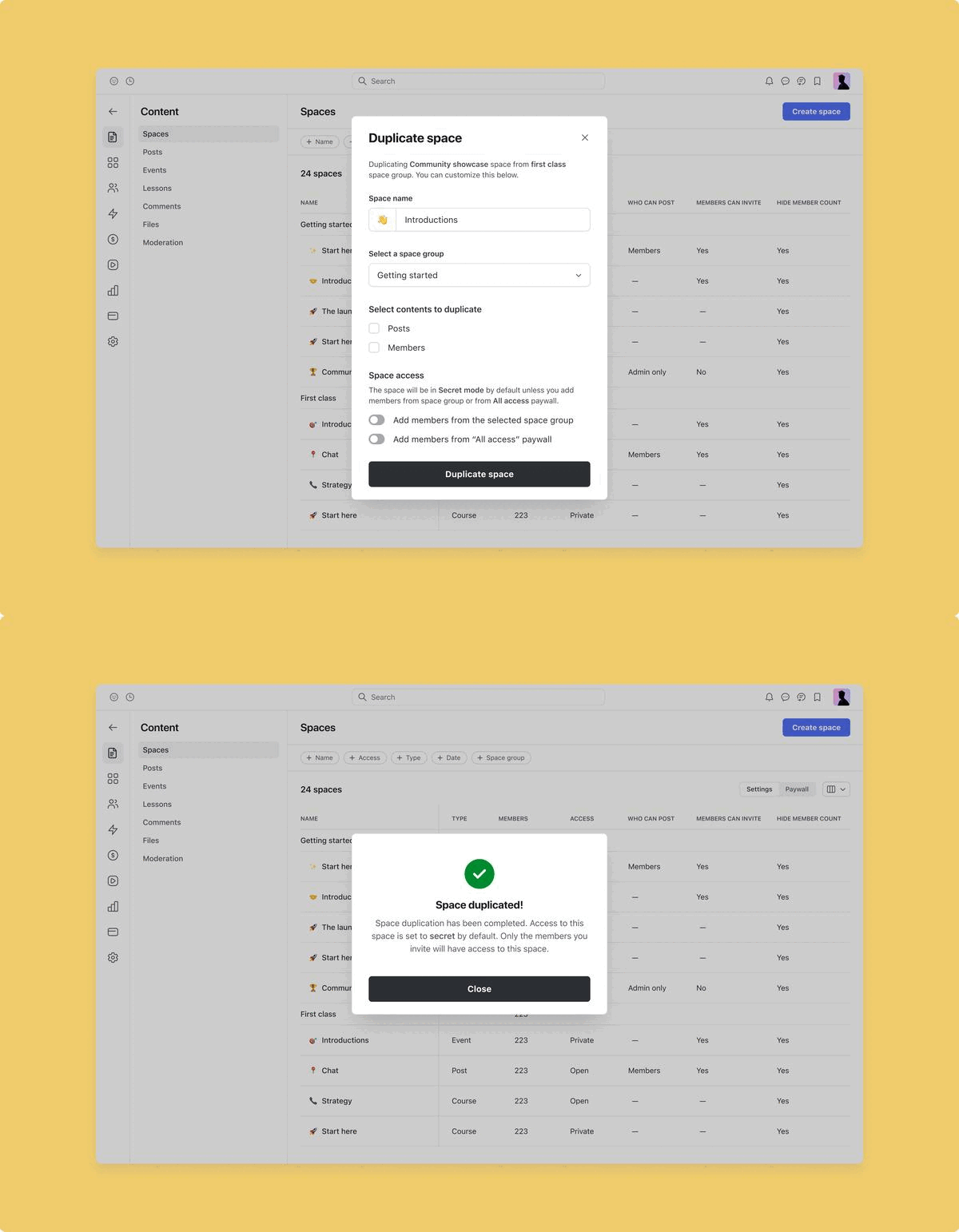
We’ve made it even easier to set up your community by adding the ability to duplicate your existing spaces with a single click!
To duplicate a space, navigate to your community’s main dropdown menu. Select Spaces and locate the space you’d like to duplicate. Click on the ellipsis menu and select Duplicate space.
One of the ways you can use this feature is by creating a secret space (visible just to admins) for a specific ‘template’ for a space you’ll need to create again in the future. And then, just duplicate that space when you need to.
Here’s how duplication works with each space type:
Post spaces
General space configuration settings, lock screens, and bookmarks
Members
Posts
Note: Comments and likes will not be duplicated for this space type.
Event spaces
General space configuration settings, lock screens, and bookmarks
Members
Chat spaces
General space configuration settings, lock screens, and bookmarks
Members
Note: Chat messages will not be duplicated for this space type.
Course spaces
General space configuration settings, lock screens, and bookmarks
Members
Lessons
Note: Comments and course progress will not be duplicated for this space type.
Member spaces
General space configuration settings, lock screens, and bookmarks
Members
⭐ If you’d like to exclude a certain space component from being duplicated (for example, its members), you can simply unselect it from the duplicate modal.
Learn more about duplicating spaces →
Emoji reactions in DMs and chat spaces
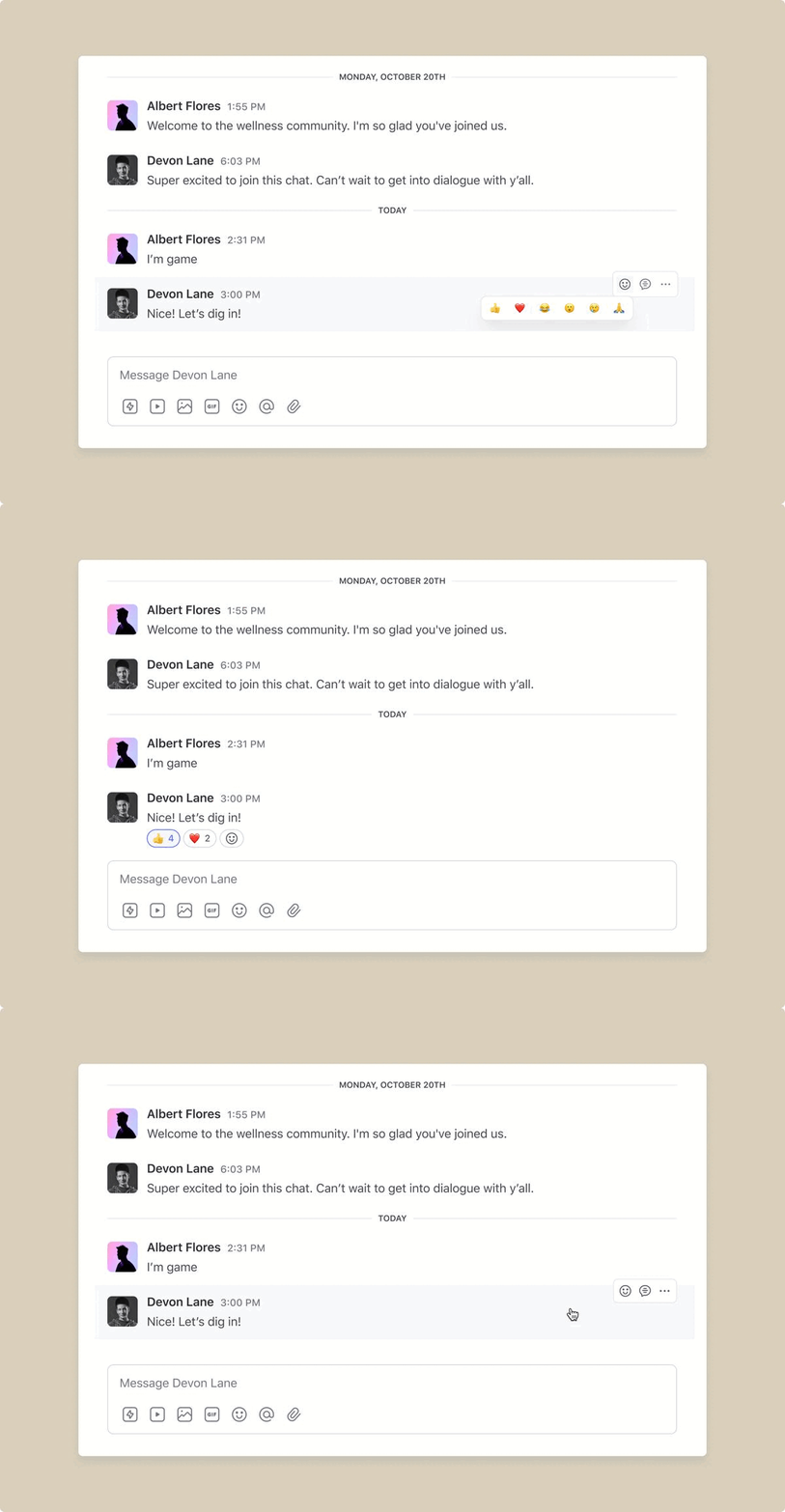
DMs and chat spaces just got more expressive with the introduction of emoji reactions!
To react to a message, you and your members can simply hover over the message, click on the react icon in the top right, and select the emoji to react with.
Chat reactions are supported on all platforms from today, including our web, iOS, Android, and Circle Plus apps.
Learn more about emoji reactions →
Notify everyone in a chat space with group mentions
As an admin, you can now send an @ mention to all the members in a private group chat or chat space using the new @everyone, @all, or @space tag.
When a member gets mentioned by you, they’ll receive an in-app notification in their “Notifications” tab just like any other mention in a chat space or group chat. Clicking on the notification will take them to the message they were tagged in.
Over the next few months, we plan on extending group mentions to members too (if the admin chooses to), and chat space-level notification preferences to all your members.
Group mentions are supported on all our platforms from today, including our web, iOS, Android, and Circle Plus apps.
Learn more about group mentions→
An Events tab for all your events
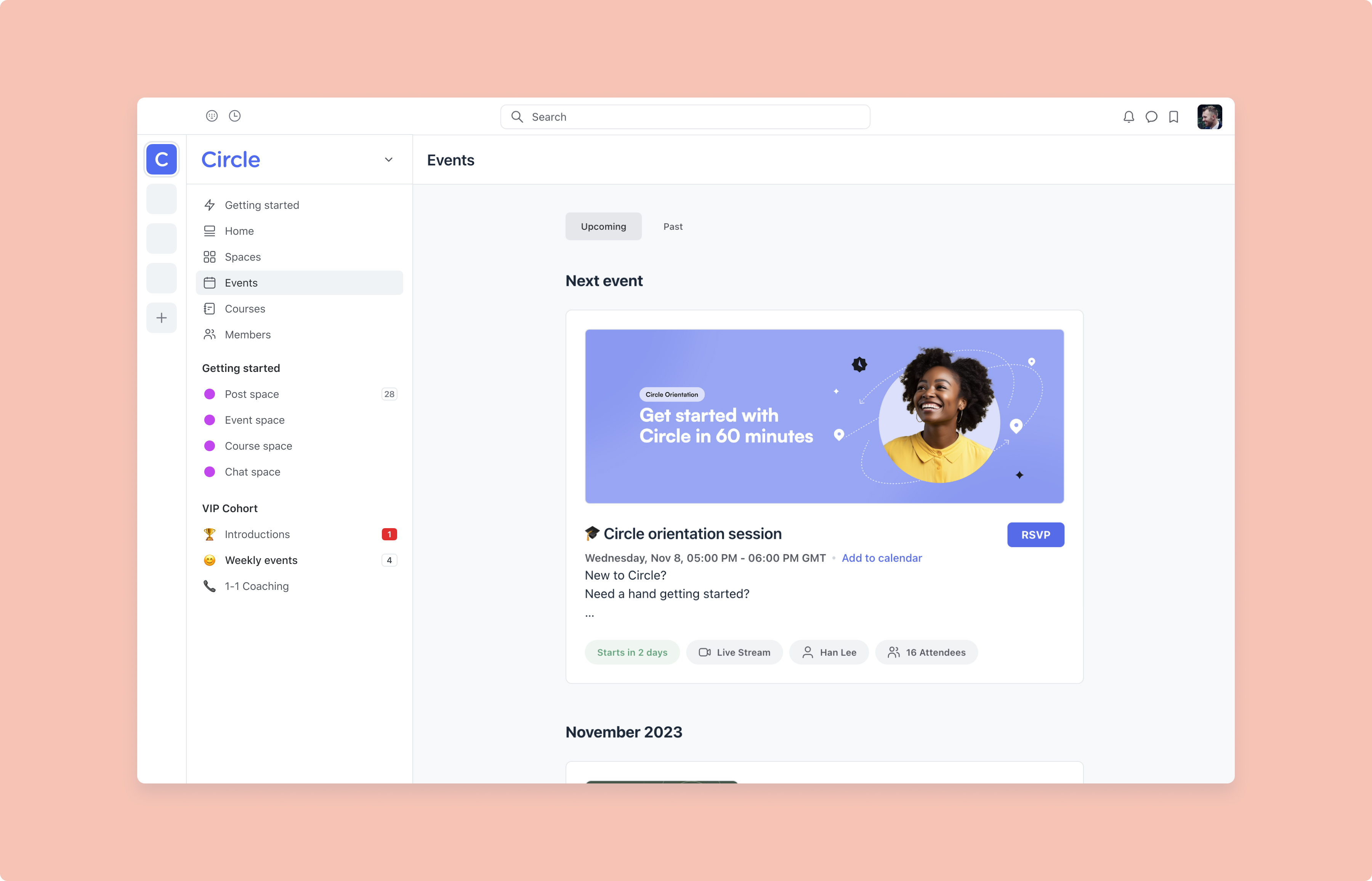
If you run events in your community, we’ve added a new Events tab to the sidebar so your members can easily find all the events in your community.
You can choose whether your members see this tab with the Private or Public button in the top right, and choose the Thumbnail or List layout.
The Events tab is available on web only right now, and will be available on our mobile apps in the next few months.
Learn more about our new Events tab →
Sort and filter your paywall reports
We’ve made it even simpler for you to monitor paywall reporting with the ability to sort and filter subscriptions and transactions from your Circle paywalls.
To check out the new filters, navigate to the main dropdown menu in your community and click on Paywalls. Select either Transactions or Subscriptions in the left hand bar.
You can filter the Subscriptions tab by:
Member
Status
Paywall
Date
Currency
Subscription ID
Total amount paid
You can filter the Transactions tab by:
Member
Status
Paywall
Date
Currency
Subscription ID
Transaction ID
Invoice ID
Amount
You can also sort by ascending or descending values by clicking on the data table headings like Name, Status, Type, etc.
Soon, we’ll be adding the ability to filter simply by a Name or Email string.
Learn more about our updated payment reports →
Custom theme colors for dark mode
We’ve released the ability to customize your theme colors specifically for dark mode.
To customize your theme, navigate to the main dropdown menu and select Customize theme. You’ll find a new dropdown menu of themes designed for dark mode, as well as a new preview area enabling you to review the design before you push it live.
Learn more about theme colors for dark mode →
Other improvements
Allow members to create events: You can allow members of your event space to create events by turning on Allow members to create events in space settings.
Member email workflow trigger: We’ve added an automated entry rule for Member changed email, which is triggered whenever a member changes their account email.
One-click unsubscribe from emails: We’ve made it easier to unsubscribe from email notifications with our new one-click unsubscribe functionality.
Adjust video tiles in live streams & rooms: You and your members can now adjust the number of video tiles visible per page from a minimum of 2 to a maximum of 16. See how here.
Mute participants in live rooms & streams: Hosts can mute all co-hosts in a live stream and all participants in a live room session.
View total comments and posts on the Analytics page: When viewing the Posts & comments tab, you’ll be able to see totals of each adjusted for your desired date range.
Double confirmation modals when performing destructive actions: To prevent unwanted actions, we’ve added in a double confirmation modal for leaving or deleting a space/space group.
Multi-line support for copilot prompts: You can now use multiple sentence prompts in our content copilot to help you generate stronger results.
Update member billing addresses: Admins can now update the billing address on behalf of their members.
iOS improvements
We also shipped a few improvements to Circle’s iOS app:
Support for entity linking in chat messages
Support for hiding space members if the member directory is disabled
Support for muting participants in live rooms and streams
Support for post, event, comment, and lesson bookmarks
Support for emoji reactions in chat spaces
Support for group mentions
Improved chat message and comment editing
Updated member mentions display
[Fix] Adding events to the calendar
[Fix] Reply count in chat threads.
Improved performance and reliability
Android improvements
Plus, here are some improvements on Circle’s Android and Circle Plus branded apps:
Support for deep linking to courses, lessons, and sections
Allow audio to play in background
Portuguese language support
Performance improvements for videos and gifs in posts
Improved overall performance and reliability
Find out how your community compares to your peers
Are you curious about how your community compares to your peers? We are too!
This month, we’re kicking off Circle’s 2024 Community Benchmark Survey. By polling 1,000+ community professionals from around the world, we’re digging deep into what sets apart the most engaging communities, and share those insights more broadly.
Respondents get early access to the data and the chance to win $1,000.
Take the survey for your chance to win →