🤖 November release: Bots, avatars, order bumps, branched workflows, and more
I’m truly excited about our November update. It’s a big one!
Circle November Updates.mp4
Launching today:
1. Bots
Create AI bots that do recurring admin work for you on a schedule, like a Monday growth report or check-ins to inactive members. Think Grok Bot in Circle.
2. Avatars
Member-facing AI agents are now called "Avatars", and we've re-built them to be more powerful than ever. Avatars can guide your members from anywhere, even inside a course lesson, in your voice. Avatar conversations cost you no AI credits.
3. Order bumps
Add a one-click add-on at checkout, like a $29 mini-course on a $50/mo membership. This helps you instantly raise your order value with no extra steps for the buyer.
4. Branched workflows
With IF/ELSE branching, you can send members down different paths by profile, activity, or plan, to personalize onboarding and re-engagement without building a separate workflow for each case.
5. Branded apps 2.0
Customize your app with templates, change the bottom navigation, create custom login screens, and easily preview updates on mobile before you make changes.
6. Improved Circle AI analytics
Ask complex questions across your member, purchase, and email data and get numbers, tables, or charts, with follow-ups. Your data is never shared outside your community, or used to train any models.
7. Simplified AI credits
We've simplified AI credits with one shared credit pool of monthly, one-time, and auto top-ups. We've added a way to set spending caps so your costs stay predictable. BTW: Community AI features (summaries, writing, transcription) are now free on every plan!
8. Share Circle
Earn up to 30% recurring commission on customers you refer to Circle.
9. Other updates
A Priority Inbox to help you filter all your notifications, allow attendees to send invites, a join prompt for livestream guests, post analytics, and new website and email builder blocks.
P.S. For our best ever Black Friday sale, you can get up to 30% off your first year of Business or Scale when you pay annually, plus double the Circle AI credits for your first month. Go to Settings → Plans in your account and upgrade to either Business or Scale to get the deal.
This is a jam-packed update, and one we’ve been working tirelessly on for many months.
Let’s dive into each one.
Meet your new AI team, built right into Circle.
Today, you can set up AI Agents in Circle to guide and support your members in your community.
With the launch of Agents 2.0, we’ll be splitting them up into two types of agents:
- Bots, which help run your business
- Avatars, which help your members
1. Bots
Create AI bots that do recurring admin work for you on a schedule. Think Grok Bot in Circle.
Bots are a new kind of agent for you and other admins on Circle.
Schedule what you need by talking to it
Create a bot, describe what you need in plain language, then set it to run on a schedule or when something happens in Circle.
For example, every Monday morning, a bot could review your revenue, purchases, and member activity, then send you growth opportunities and recommended next steps.
Bots can also prepare posts, message members, update tags, and run workflows. You decide what they can do and which actions need your approval.
03-bots-growth-advisor_3600x2312.mp4Build Bots for any job
You can build a bot for almost any ongoing job. We’re also creating ready-made bots to help you get started:
Chief of Staff: Tracks goals and priorities, with a weekly update on what needs attention.
Member Success Manager: Spots members who need support and drafts personal check-ins.
Upgrade Scout: Reviews sales, renewals, and programs to find growth opportunities.
Events Coordinator: Prepares event reminders, recaps, and follow-ups.
You can fine-tune a bot by chatting directly with it or editing its instructions manually, and review its activity history anytime.
For example, after reviewing your weekly growth report, you could tell your bot in a conversation: “Next time, focus the report on members who haven't enrolled in a course yet, and suggest ways to get them started.” Your bot will use that feedback to improve its settings automatically, and adjust the weekly report sent for following weeks.
Unlimited bots
There’s no limit on how many bots you can create. They use the same credits as Circle AI, so you can start with one useful job and add more as you grow.
This is a big step toward making Circle more than a place to manage your business. It’s a place where more of the work gets done for you.
To learn more about bots, check out our guide here.
Bots are available on our Business plan and above.
2. Avatars
Member-facing AI agents are now called "Avatars", and we've re-built them to be more powerful than ever.
Previously, your member-facing agents were only available through DMs.
Now, members can open an avatar in a new site-wide widget, including while taking a course or reading a post. And when an avatar sends a DM through a workflow, members can continue that conversation right from the widget.
01b-avatars-member-widget_3600x2312.mp4Avatars also have more knowledge to work with. They can now use events, your member directory, the Circle Help Center, and search the web. For example, an avatar can recommend other members to connect with based on your member directory.
Easier setup
We’ve also made setup much simpler. Each avatar now has its own knowledge settings, so there’s no separate Knowledge Engine to manage. You can create an avatar by chatting with Circle AI, describe its purpose, tone, and rules in one place, and tell it in plain language when to stop responding and bring in a person into the conversation.
02-avatars-knowledge-behavior_3600x2312.mp4You can still review conversations in your AI Inbox and step in whenever needed.
To learn more about avatars, check out our guide here.
As with AI Agents, avatars are available on our Scale plan and above. Avatar conversations with members don’t cost you any AI credits. Give it a try today!
Thinking about upgrading to Scale? Our Black Friday deal is a great time to do it. Get up to 30% off your first year when you pay annually, plus extra Circle AI credits to get started.
👉 To get this deal, go to Settings → Plans in your account and upgrade to Scale.
3. Order bumps
Add a one-click add-on at checkout, like a $29 mini-course on a $50/mo membership.
Last month, we introduced upsell upgrades for after checkout for Circle paywalls. Now, order bumps let you offer an extra product right before checkout.
The offer appears above the purchase button. Members can add it with one click, and everything is included in the same purchase with no extra steps.
06-order-bumps-member_3600x2312.mp4You can use order bumps to offer a related mini-course, workshop, or resource, or give an existing product another way to sell.
07-order-bumps-admin_3600x2312.mp4To set one up, open your paywall, choose the add-on product and select a one-time price. Then optionally adjust the headline, description, and image. Circle handles the rest.
To learn more about order bumps, check out our guide here.
Rolling out today, with everyone getting access by month-end.
Want Order Bumps for your Black Friday and Cyber Monday sales? Comment below for early access 😎
4. Branched workflows
Create more personal member experiences with IF/ELSE branching.
It’s finally here!
You can now add condition IF/ELSE branches to your Workflows, sending members down different paths based on their profile, activity, or subscription.
09-workflow-branching_3600x2312.mp4Use branches to personalize onboarding, re-engage inactive members, or manage access when subscriptions change. Each branch has a Yes and No path, and paths can’t merge back together yet.
To learn more, check out our guide here.
Rolling out now, available at no additional cost on plans that include Workflows.
5. Branded apps 2.0
Customize your app with templates, change the bottom navigation, create custom login screens, and easily preview updates on mobile before you make changes.
For over a year, our drag-and-drop branded app builder has let you customize your app, add custom screens, and bring in tools you've built with HTML.
With AI and vibe coding, we're seeing more customers create their own member portals, trackers, accountability tools, and other custom experiences. We want to make it easier for those tools to work seamlessly inside Circle.
This month, we're taking another step in that direction with secure member authentication for custom screens. Members can now use the tools you've built without logging in again. Circle passes a secure member token that your tool's server can verify, so it knows who's using it. We've also created a ready-made prompt to help you set this up with an AI app builder or developer.
We're also introducing a few new ways to customize your branded app:
Brand-new bottom navigation. Give members one-tap access to the most important parts of your app. Drag and drop to customize the navigation bar, and choose what appears in the member settings menu.
Five new app templates. Choose from Community, Courses, Events, Messaging, or Coaching. Each suggests a setup for your home page tabs, bottom navigation, and member settings menu that you can customize.
Custom login screens. Choose from four layouts, including a full-page image, half-page image, brand color, or just your logo.
A new home for managing your app.
We've also rebuilt the branded app dashboard and settings, making it easier to find what you need and see how your app is performing at a glance.
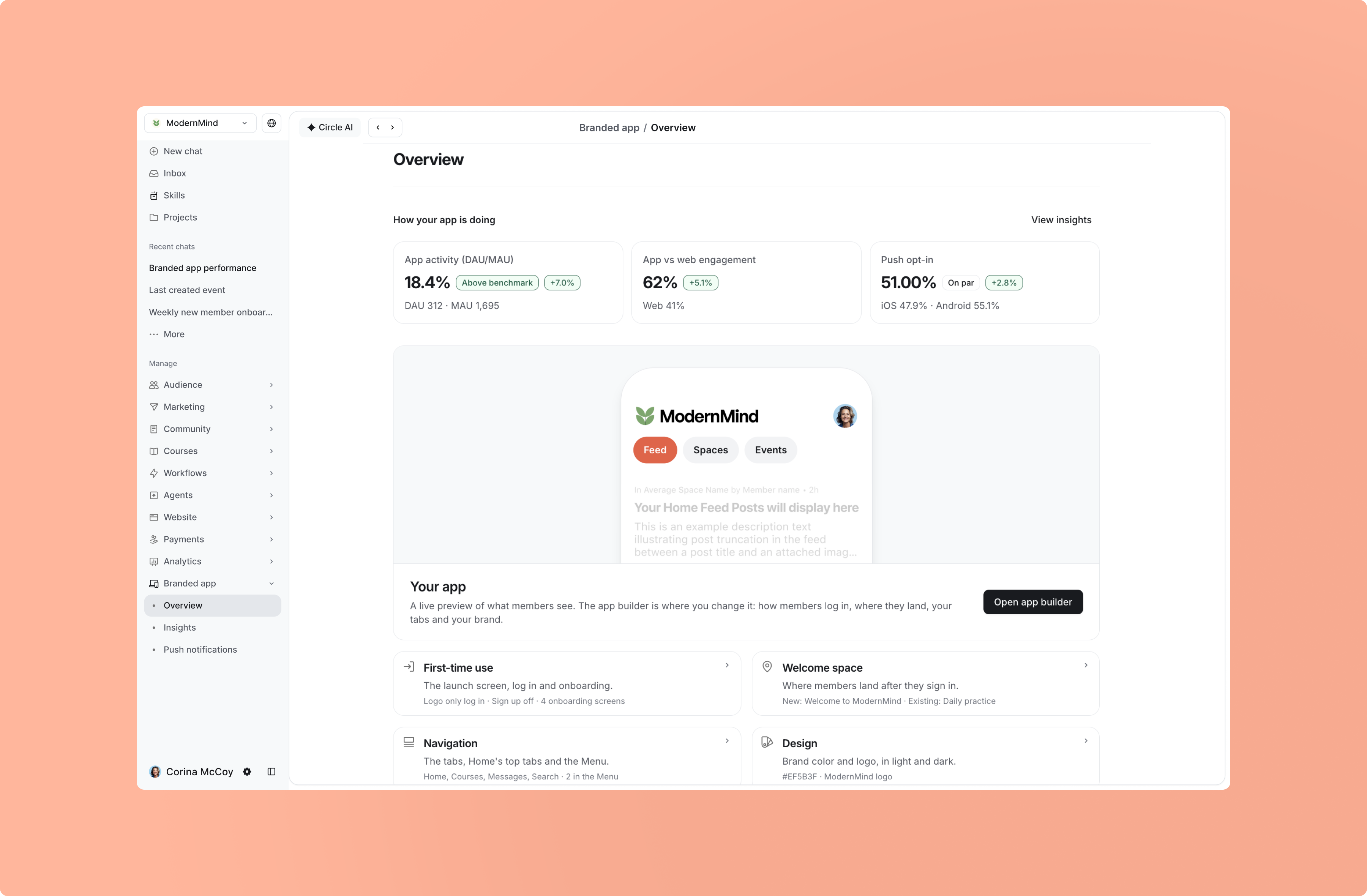
You can preview changes directly in the builder, then scan a QR code to try the experience on your phone before members do.
10-branded-apps_3600x2312.mp4Whether you're updating an existing branded app or building your first one, we're excited to give you more ways to make it your own.
To learn more, check out our branded apps guide here.
Member authentication for custom screens is available today. Templates, the new bottom navigation, login customization, and updated builder roll out by the end of November. Available to customers with a branded app on Circle Plus.
6. Improved analytics in Circle AI
Ask complex questions across your member, purchase, and email data and get numbers, tables, or charts, with follow-ups.
We’ve rebuilt analytics and data queries in Circle AI from the ground up to help you explore more of your business data and combine information across any part of Circle.
You can now:
Go deeper. Explore member activity, purchases, email clicks, and more.
Connect the dots. See how data from different parts of your business relate.
Ask follow-up questions. Break down your numbers without relying on preset filters.
See results your way. Get answers as numbers, tables, charts, or any format you want.
For example, if you’ve sent an email broadcast before, you can ask: “Which links in my last broadcast got the most clicks, and who clicked them?”
Bots get these improved capabilities too, so they can analyze your business and bring you new insights on a schedule.
Your data is never shared outside your community, or used to train any models.
To learn more, check out our guide here.
7. Simplified AI credits
One shared credit pool of monthly, one-time, and auto top-ups.
Circle AI, bots, and AI actions now use one pool of credits included with your plan, so you don’t have to manage separate balances.
You also have more ways to add additional credits:
Recurring credits: Add extra credits monthly at a discount, replacing our previous add-ons
One-time top-ups: Buy credits whenever you need them, valid for 12 months
Automatic top-ups: Refill automatically when your balance runs low and add a monthly spending limit to control your spend
A new card under the top-left dropdown of your admin sidebar shows your balance and usage, and we’ll alert you when you’re running low. If you run out, features that use AI credits will pause until you add more.
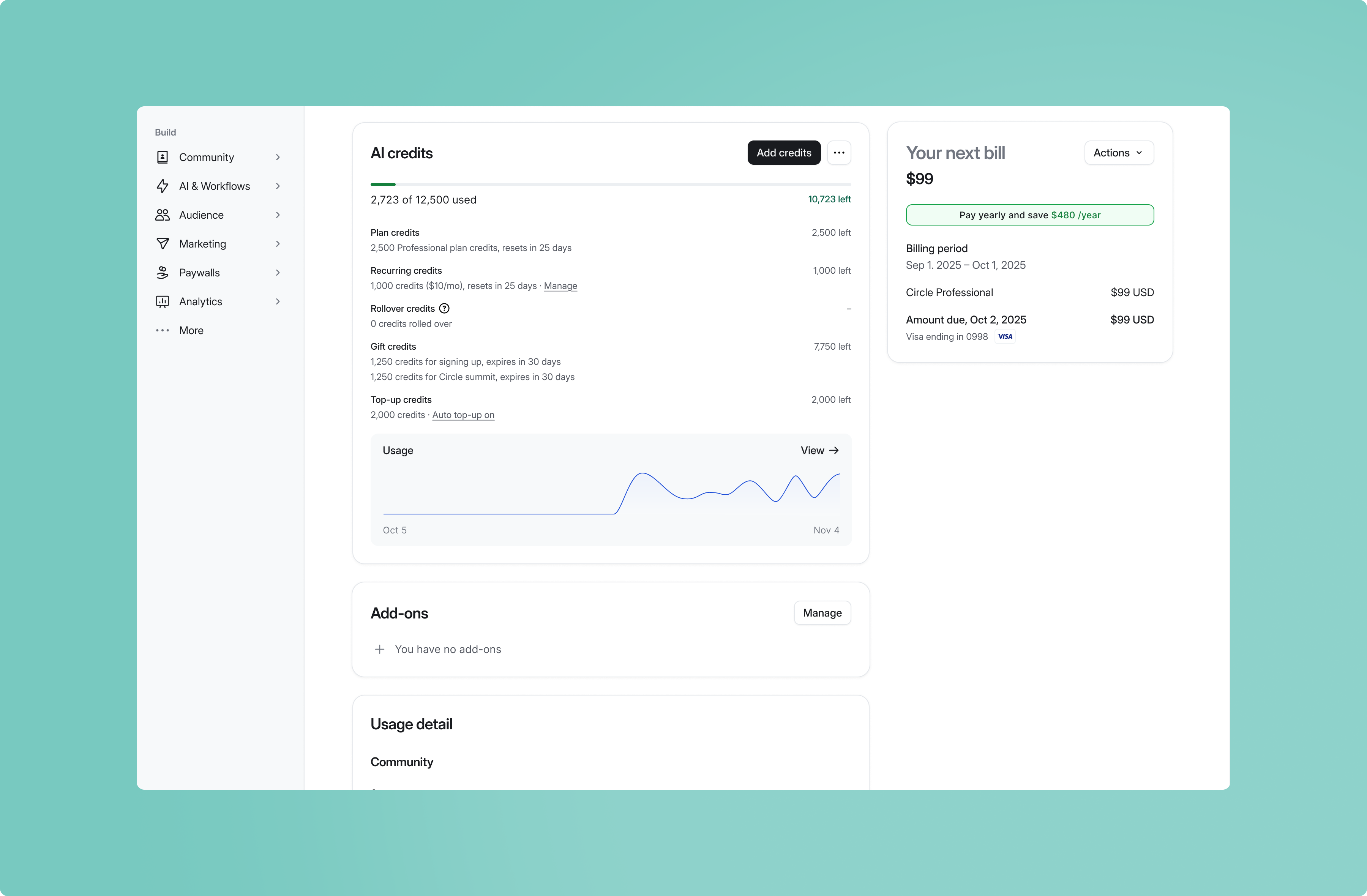
We’re also making all Community AI features, including summaries, content writing, transcription, and activity scores, available on every plan at no additional cost. They don’t use AI credits.
To learn more, check out our guide here.
Available today.
8. Share Circle and earn forever
Earn up to 30% recurring commission on customers you refer to Circle.
Today, we’re making it easier than ever to share Circle and earn some of our most generous commissions yet.
Here's what you'll earn:
30% recurring commissions on standard Circle plans, including Business, Scale, and Professional.
10% recurring commissions on Circle Plus plans.
30% recurring commissions on Circle's payment fees from eligible referred customers who sell courses, memberships, and content through Circle.
Getting started takes seconds. The affiliate program is now built right into Circle. Just click Share Circle in the drop down of your admin menu to join instantly. There's no application or separate login. You'll get your referral link and can track signups, customers, and earnings all in one place.
08-affiliate-admin_3600x2312.mp4Some of our best customers have helped us grow by recommending Circle to other creators and business owners. We’re incredibly grateful for each and every recommendation, and don’t take this lightly.
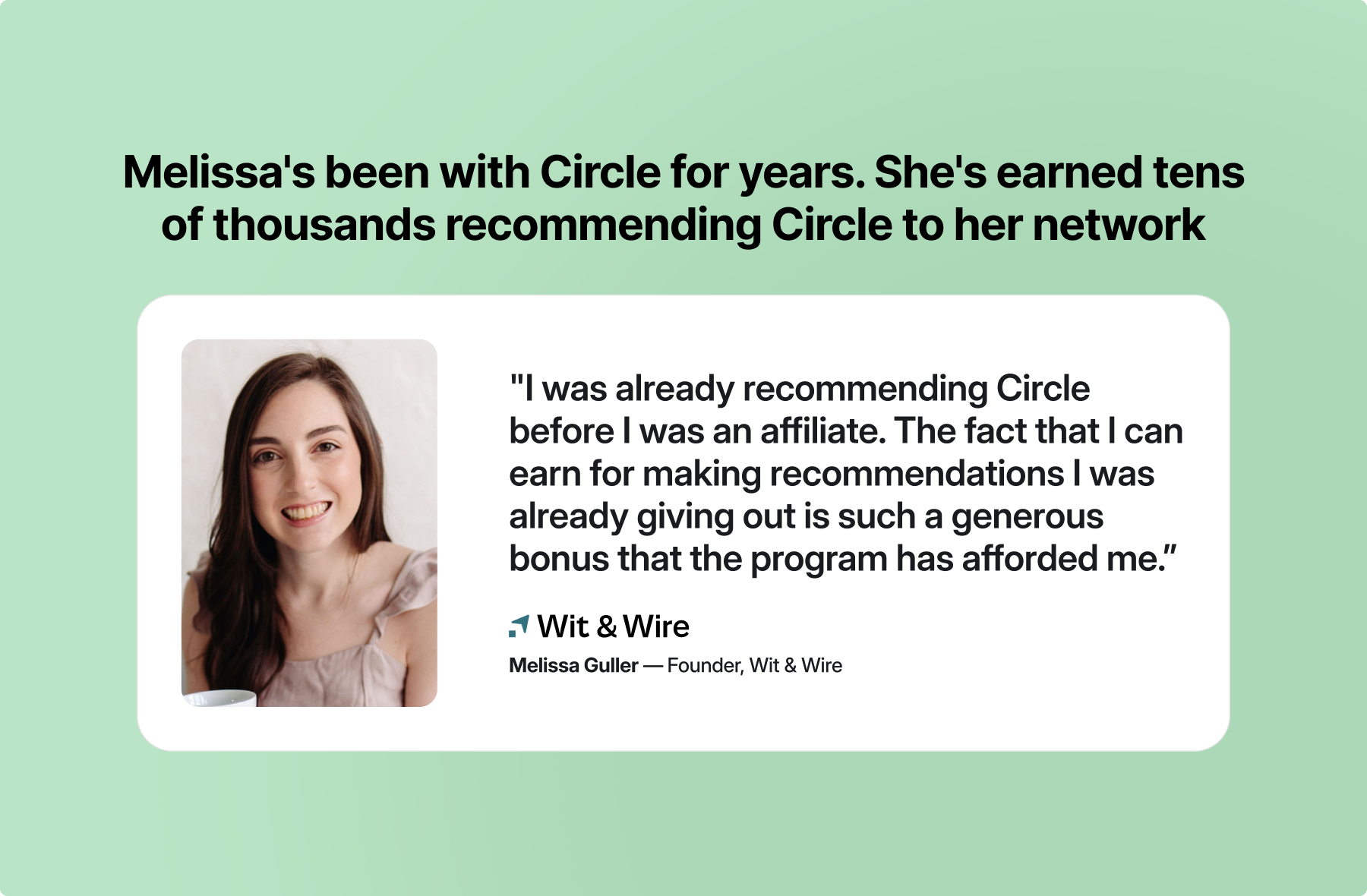
Existing affiliates will also see their affiliate link and referral history in Circle when using the same email. You’ll keep your commission rates as long as you refer at least one new paying customer every 12 months. Full details are in our Affiliate Terms.
Going forward, I’m truly excited to reward our most generous advocates with the most generous referral program out there.
Learn more on our Affiliate Program page.
Free to join. Available today for admins on all plans.
9. Other updates
A few more improvements this month. In any other month, these updates would have been headliners :)
Priority Inbox. See conversations waiting 12+ hours for a reply in one prioritized list, with urgent member issues first in the “Inbox” tab of your admin side.
Invite others to events. Attendees can now invite other people to your events, making it easier to spread the word and bring more people together.
Turn livestream guests into members. Guests watching your livestreams now see a prompt to join your community, giving them an easy next step to stay connected.
Post analytics. Track views, comments, reactions, and trends over time for any post.
New website builder blocks. Add accordions and See more/less sections with help from Circle AI, plus warnings for overflowing content.
Lists in the email builder. Add bulleted and numbered lists directly inside Paragraph blocks.
Circle iOS and Android app improvements
We’ve also made the Circle app easier to use:
Easier sign-in and signup, with better verification code autofill.
Smoother conversations, with improvements to chat navigation and reactions.
Better video and image browsing, including fixes for sharing and scrolling.
Cleaner iPad layouts, plus performance and stability improvements.
Last, but not the least… our biggest Black Friday sale ever is here 🎉
Get up to 30% off your first year of Business or Scale, plus double the Circle AI credits for your first month.
With Business or Scale, you can automate the little things that eat up your day, give members a more personal experience, and even have AI Agents helping you run things behind the scenes.
You’ll spend less time managing everything and more time making your business a success. And you’ve got our lowest prices ever to make it happen.
👉 To get this deal, go to Settings → Plans in your account and upgrade to Business or Scale.