🎫 May update: Paid events, activity logs, and 10+ other updates
I’ve been excited for these releases for a very long time… it’s such a joy to finally get these into your hands!
Let’s dive in 👇
Introducing paid events
It takes a lot of work to run a great event, and some events are more valuable than others. That’s why we’re excited to introduce a way for you to monetize your events with paid events.
Now, you can easily charge for events in your community and diversify your revenue stream.
Event Ticketing.mp4
Create a paid event
To create a paid event, you’ll first need to make sure you’ve connected your Stripe account to Circle paywalls.
Once you’ve done that, create an event and choose the Paid event option under the heading which says: Is this a paid event?. Then, set a ticket price, choose your currency, and set an optional checkout description.
And it’s as easy as that!
When you add a ticket price, visitors and members to your event page will see a Buy ticket button along with the price and navigate to the checkout page on click. Once they checkout, they’ll show up as an event attendee, receive reminders for your event, and unlock access to the location or live link.
Ticket options
Limit RSVPs: If you’d like to limit the number of attendees, you can do so by turning on the Limit RSVPs toggle in the Advanced tab.
Recurring events: When you set a price on a recurring event, this price applies to all events in the recurring series.
Single tiered ticketing only: Currently, only a single ticket price can be set for an event. If you’d like to offer ticket prices at multiple tiers, a workaround for now would be to create multiple events for each tier, or a private event space for each subscription type linked to your community’s subscription tiers.
One-time tickets only: Currently, only a one-time charge can be set for an event. If you’d like to offer events with installment pricing or a recurring subscription, we recommend gating the event space as a whole to an installment or subscription paywall.
Public events
If you have a private event space or community, you can share your paid events publicly by using the Share button on the event page to generate a unique sharable link.
When they get to your page, non-members will be able to click the Buy ticket on the event page and purchase your event. Upon purchasing, they’ll be added to your community as a member and as a member to the event space.
Purchasing an event won’t automatically unlock access to other spaces for visitors or members. To unlock access to other spaces after someone purchases your event, you can consider setting up an automated workflow:
Entry rule: Member RSVP’d to an event > Specific event > Select the event
Action: Add a member to a space > Specific space > Select the space
Purchase receipts
You can find a list of all your event ticket purchases in the Transactions tab on the Paywalls page. To refund a payment, simply find the affected customer, click on the ellipsis menu and select Refund payment. Note that removing a member from the event will not automatically refund their purchase — you’ll need to follow the above steps to initiate a refund.
You’ll also be able to see a cumulative total of tickets sold and revenue earned from your paid events on your community analytics dashboard. To see a snapshot of your event sales, go to Analytics > Events.
Learn more about our paid events →
Activity logs
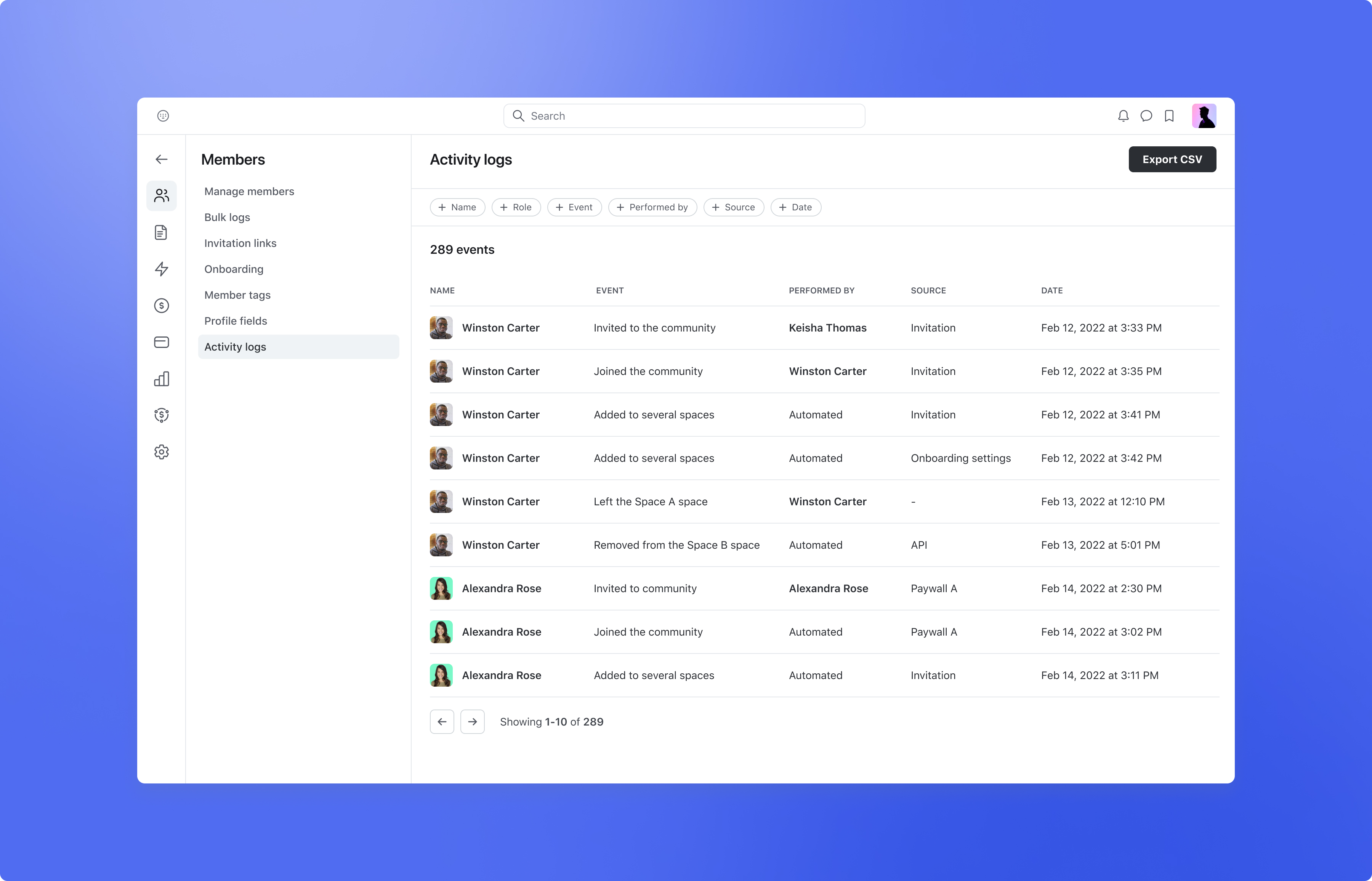
We’re excited to introduce a powerful new feature to customers on our Circle Plus plan: activity logs.
With activity logs, admins of Circle Plus communities can now see a full history and log data for activity across their community, making it easy to troubleshoot issues, deeply understand member behavior, and have an audit trail for security and back up purposes.
To access your activity log, navigate to your community’s main dropdown menu and select Settings > Members > Activity logs if you’re on the Circle Plus plan.
There, you’ll see a list of events along with the action taken, date and time of the action, the member or admin who performed the action, and the source of the action (i.e. direct action, workflow, API, etc.) Soon, you’ll also be able to see logs on a member level.
Event types include updates and deletions to data in your community, including deletions to spaces, posts, and comments. These types of events are ideal for identifying the cause of a destructive action in cases where content or members get accidentally removed.
Roll-out starts soon, and will be complete by June 15, 2024 to customers on the Circle Plus plan.
Search filters and sorting
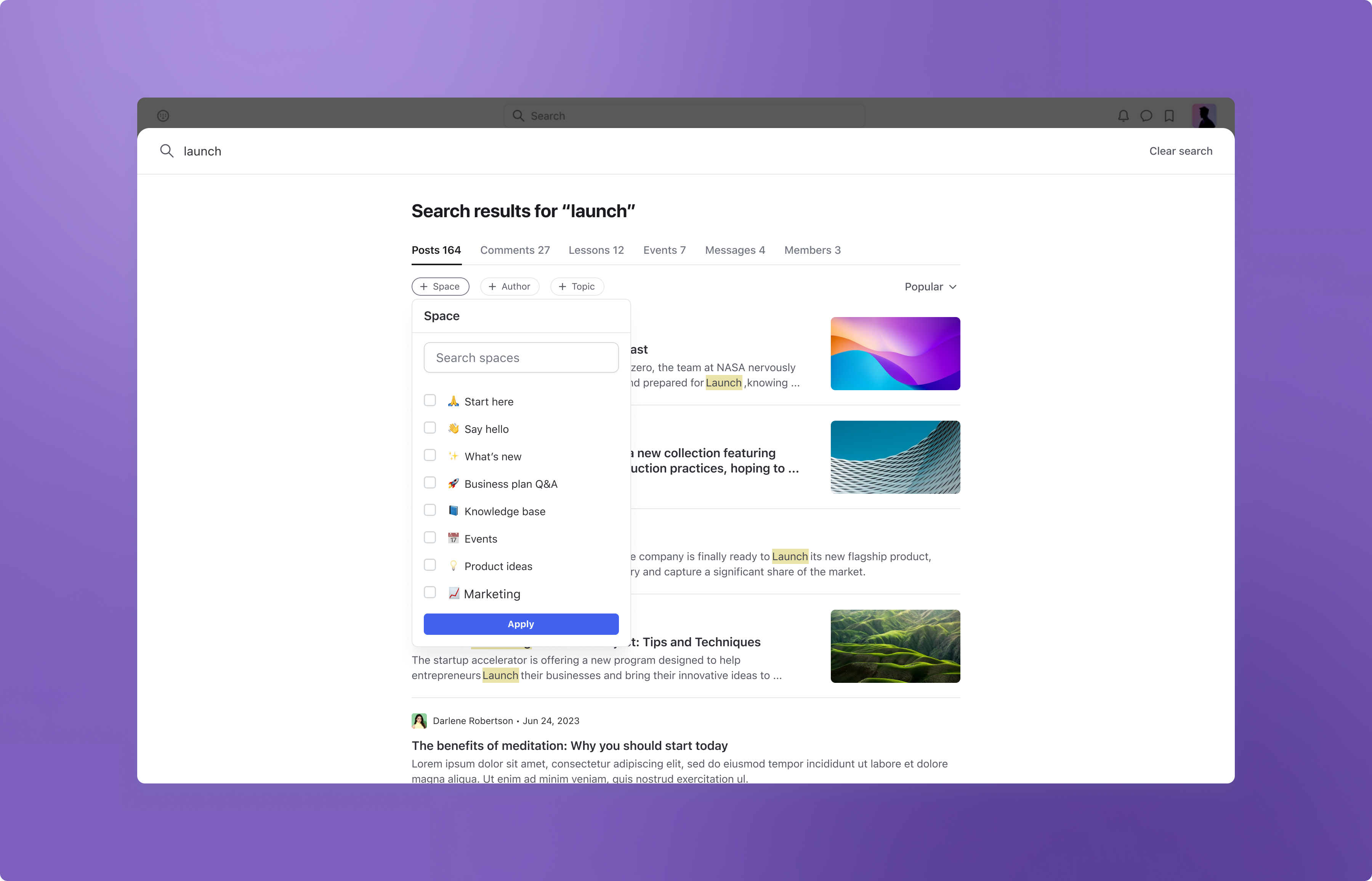
We’ve added new sorting and filtering options to search, so your members can find what they’re looking for with ease.
You and your members can now sort your search results by Latest, Oldest, Popular, Likes, Alphabetical, or New activity.
Plus, the following filters are now available to help further narrow your search results:
Filters for posts: Space, Author, Topics
Filters for comments: Space, Author
Filters for lessons: Space
Filters for events: Space, Status
Filters for members: Tag
MOV video support in posts
We’re introducing support for MOV files in posts. Additionally, all videos uploaded to posts will now be transcoded for faster playback and a consistent streaming experience across all devices.
Rollout will begin June 10, and will be available to all customers by June 20.
Third-party affiliate link tracking
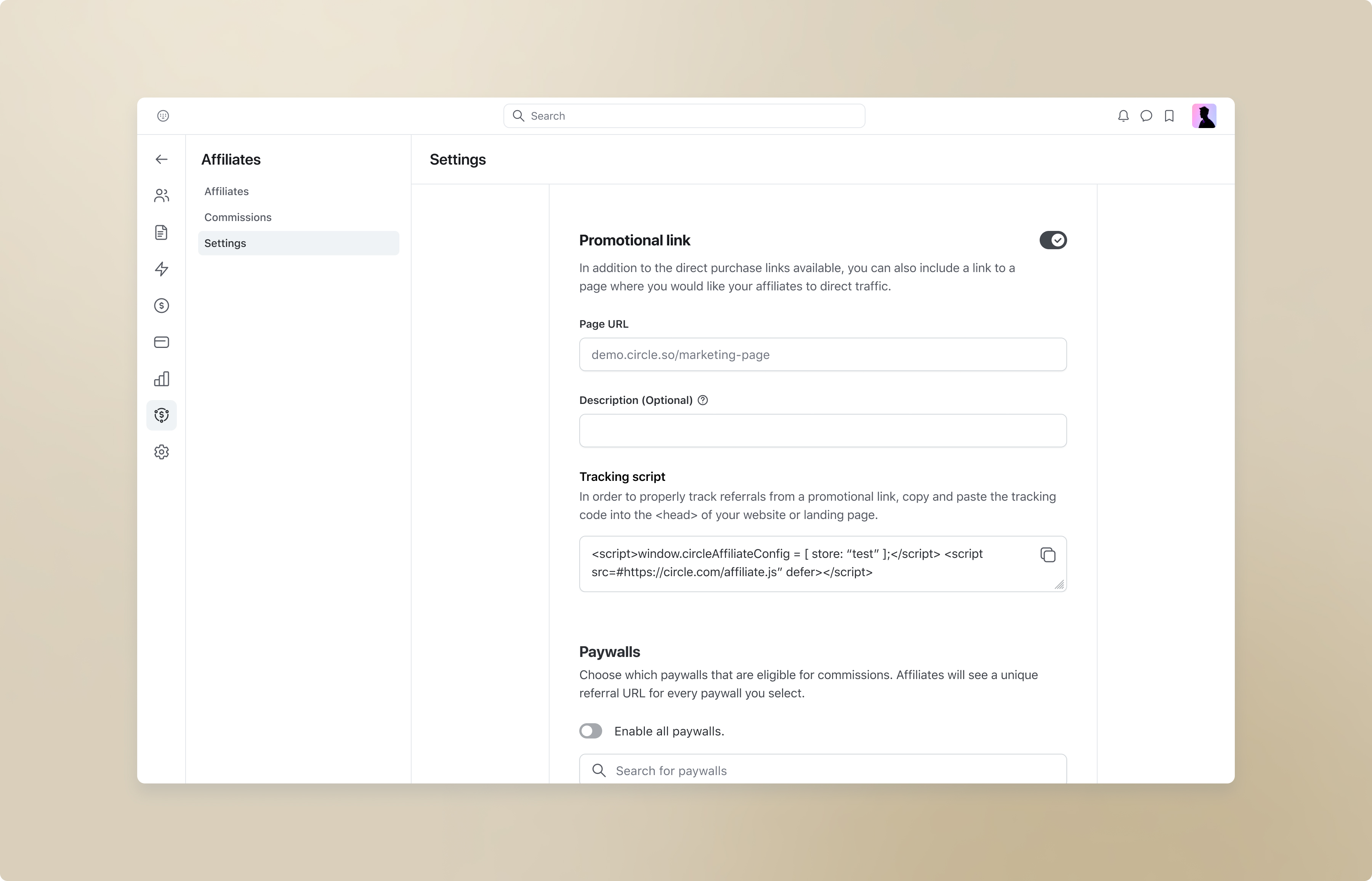
We’ve made it simpler to attribute affiliate commissions for communities who use external landing pages to drive new member acquisition.
Now, community admins can create promotional tracking links for their external websites, ensuring that affiliates are credited for all sales using their links.
To create a promotional tracking link for your external landing page, navigate to your community’s main dropdown menu and select Affiliates. On the Settings page, toggle on Promotional link and enter the URL for your external landing page.
You’ll also have the option of adding a short description to provide affiliates with more context about the link, landing page, or program. When completed, scroll to the bottom of the page and click Save changes.
Once the changes have been saved, you can now copy the Tracking script provided and paste it into your landing page’s <head> area code.
Affiliates will be able to access these links on their affiliate dashboard and share them with their prospective customers.
When an affiliate drives a prospective customer to your landing page and that customer proceeds to purchase your community’s paywall, you’ll be able to attribute that sale back to the correct affiliate within Circle.
Learn more about affiliate tracking →
Allow members to cancel subscriptions during a trial
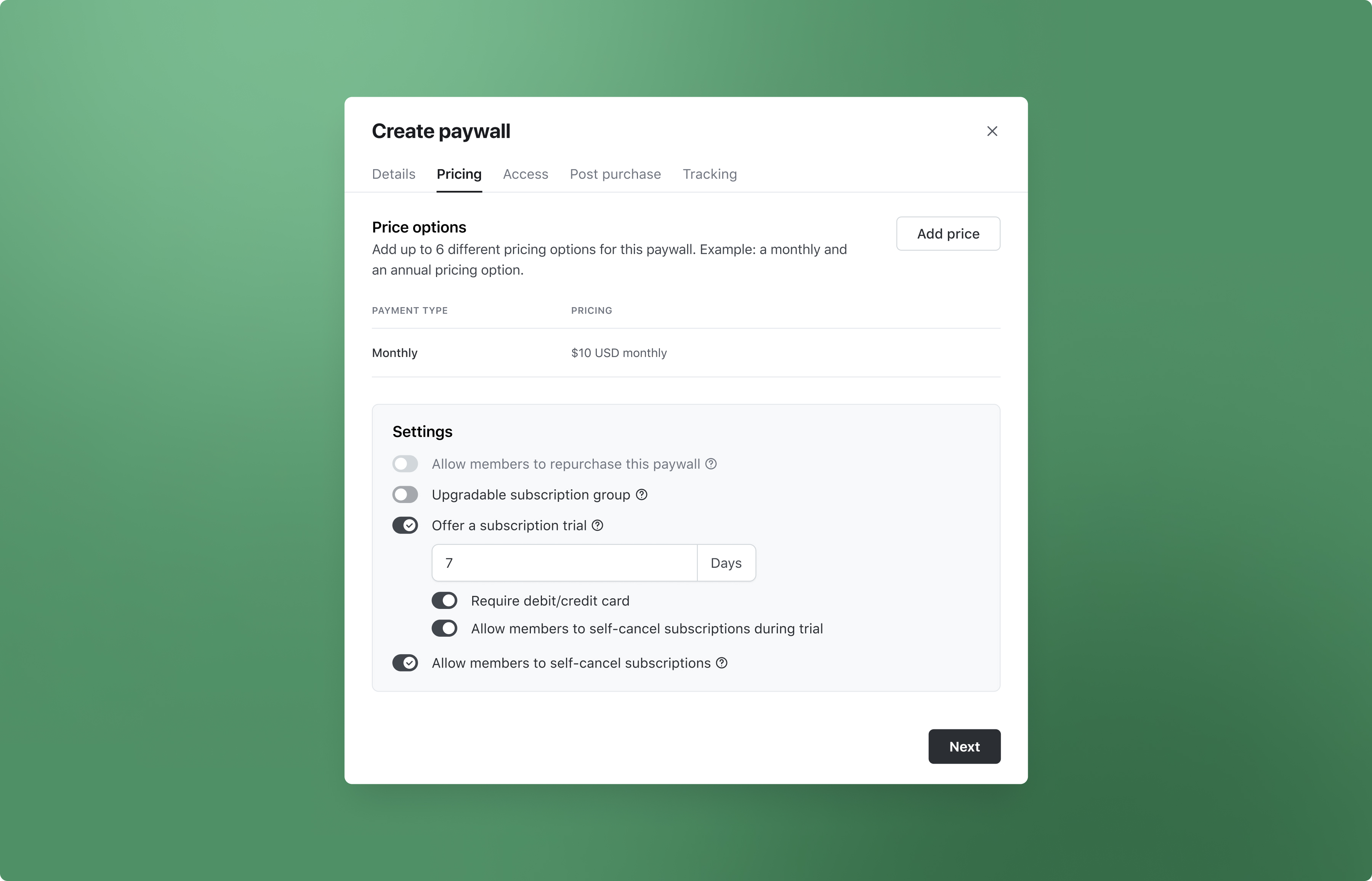
When offering a trial period on a paywall subscription, you now have the option to allow members to self-cancel their trial without any action required from admins.
To enable this option, you’ll need to click into the Pricing tab on the edit paywall modal. When the Offer a trial toggle is on, you can then switch on Allow members to self-cancel subscriptions during trial.
Once toggled on, members can now manage their subscriptions within their own accounts by navigating to Account > Billing.
Learn more about our paywalls →
Improved noise suppression in live rooms and streams
You and your members can now enable advanced noise suppression in live rooms and streams to get rid of distracting background noises.
To enable noise suppression for your microphone, click on the Settings icon (⚙️) when testing your camera and audio before starting or joining a live room/steam. Under Noise suppression profile, select Advanced.
Other improvements
Saved course progress upon rejoining: When a student abandons a course and then rejoins, their progress will remain saved so they can pick up where they left off.
Members can now mention @everyone and @all in chat spaces: Your members now have the ability to use @everyone and @all mentions in chat spaces.
Improved speeds for deleting spaces: We’ve made the deletion of spaces (including large spaces) almost instantaneous, removing any wait times, or time outs.
Header section in Knowledge Base articles: We’ve added a new header section to our Knowledge Base articles called IN THIS ARTICLE which highlights the main sections of each article. This will help users find relevant information even faster. Available on both English and Portuguese versions of the Knowledge Base.
iOS improvements
We also shipped a few improvements to Circle’s iOS app:
Support for space banners
Improved audio experience
Expandable bio text on member profiles
[Fix] Marking chat as read when deep-linked
Performance, reliability, and UI/UX improvements
Android improvements
Plus, here are some improvements on Circle’s Android and Circle Plus branded apps:
Support for paid events
New event space UI and support for list view
New onboarding flow for Circle plus
Ability to add topics to image posts
Ability to edit image posts
Ability to bookmark messages
Show event attendees when clicking facepile
Performance, reliability, and UI/UX improvements
RSVP for the next Product with Pedro

Pedro Hernandes will walk you through the latest features and improvements to the Circle platform. He’ll cover:
This month’s top features
Where to access them and how to set them up in your community
Use case examples to better serve your needs
Plus, you’ll get a chance to ask any questions live!